What Wegweiser does
You use it to record your own emergency planning. Couples can also keep one folder together.
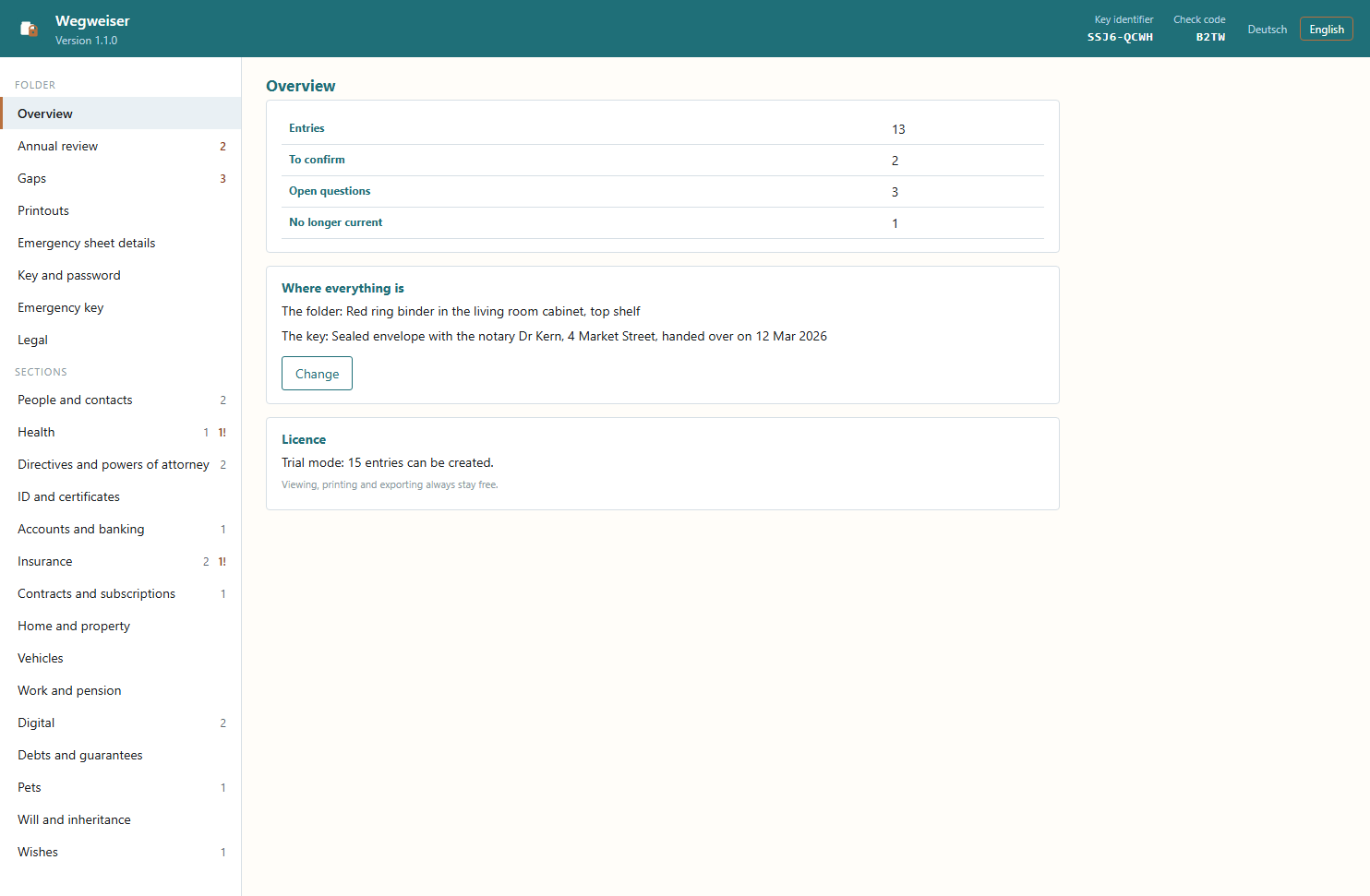
Everything in one folder
Accounts, contracts, powers of attorney and wishes in 15 sections.
Annual review
The program shows you what you should check.
Printouts
Wallet card, emergency sheet, binder and key sheet.
Wallet card
For your wallet, with no login details.
Encrypted
Your folder opens only with your password or the key sheet.
Emergency key
Optional: access for your family after your death.
How to set up your folder
- 1Create the folderWith your own password
- 2Fill it inSection by section
- 3PrintCard, sheet and binder
- 4Key sheetKeep it somewhere else
- 5ReviewOnce a year
Everything important in 15 areas
The folder ranges from contacts, health, accounts and insurance to pets and personal wishes. The structure helps you think of everything that matters.
- The program shows you where something is still missing from the folder.
- Suitable fields for each section, for example who should be called first
- You note where the originals of powers of attorney and certificates are kept
A review once a year
The program shows you each entry that is due for review, one at a time. Anything out of date is marked on the printout.
- Every entry shows when you last confirmed it.
- One click per entry: still correct, has changed or no longer current
- The program asks you to review health details more often than other sections
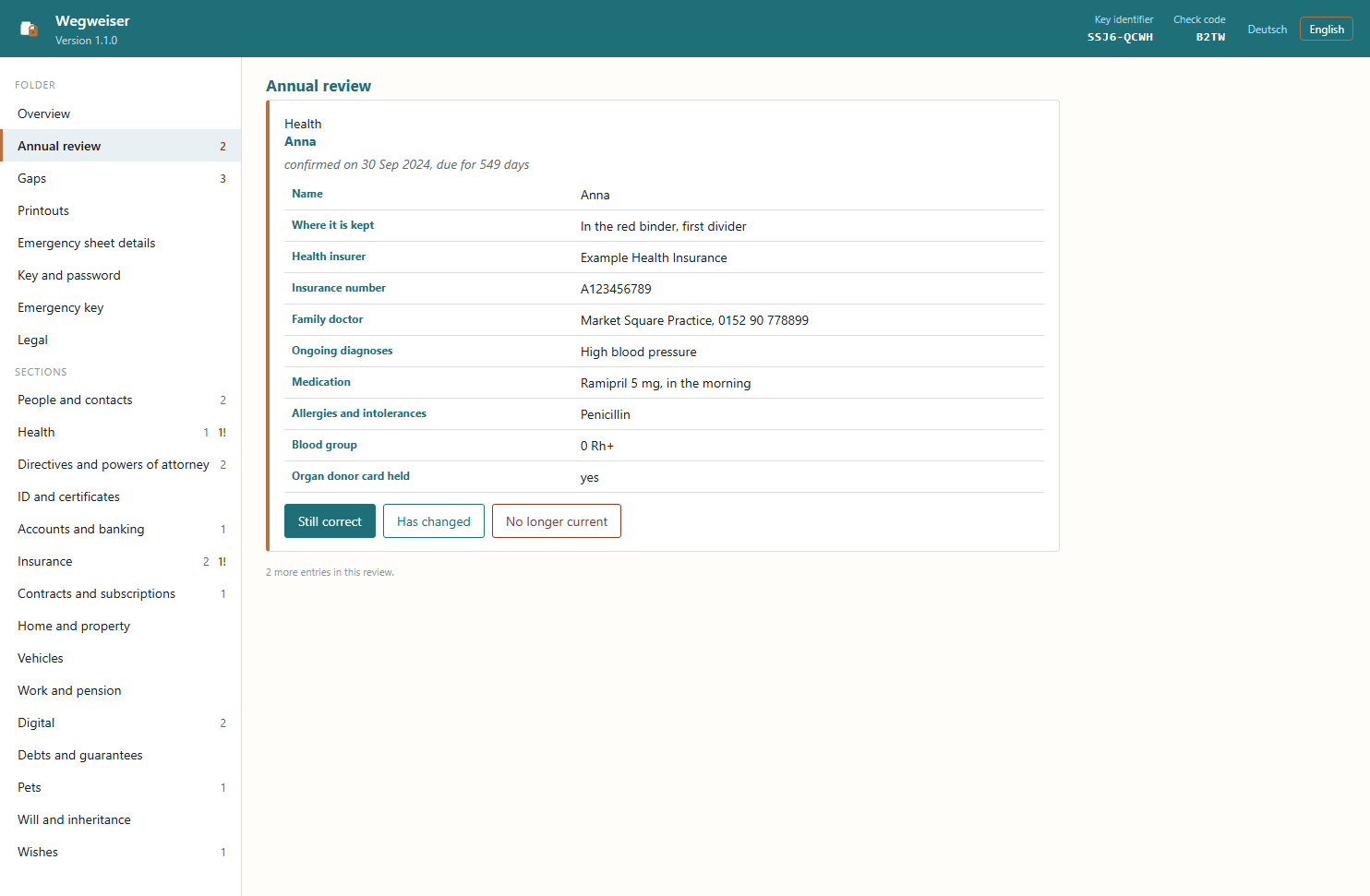
In the annual review, you confirm each entry one by one or note what has changed.
The program asks
Under “Gaps”, Wegweiser shows where something is missing or does not fit together. It only asks; nothing is created automatically.
- For example motor insurance without a vehicle in the folder.
- Or a directive that nobody has a copy of.
- “Go there” takes you straight to the matching entry.
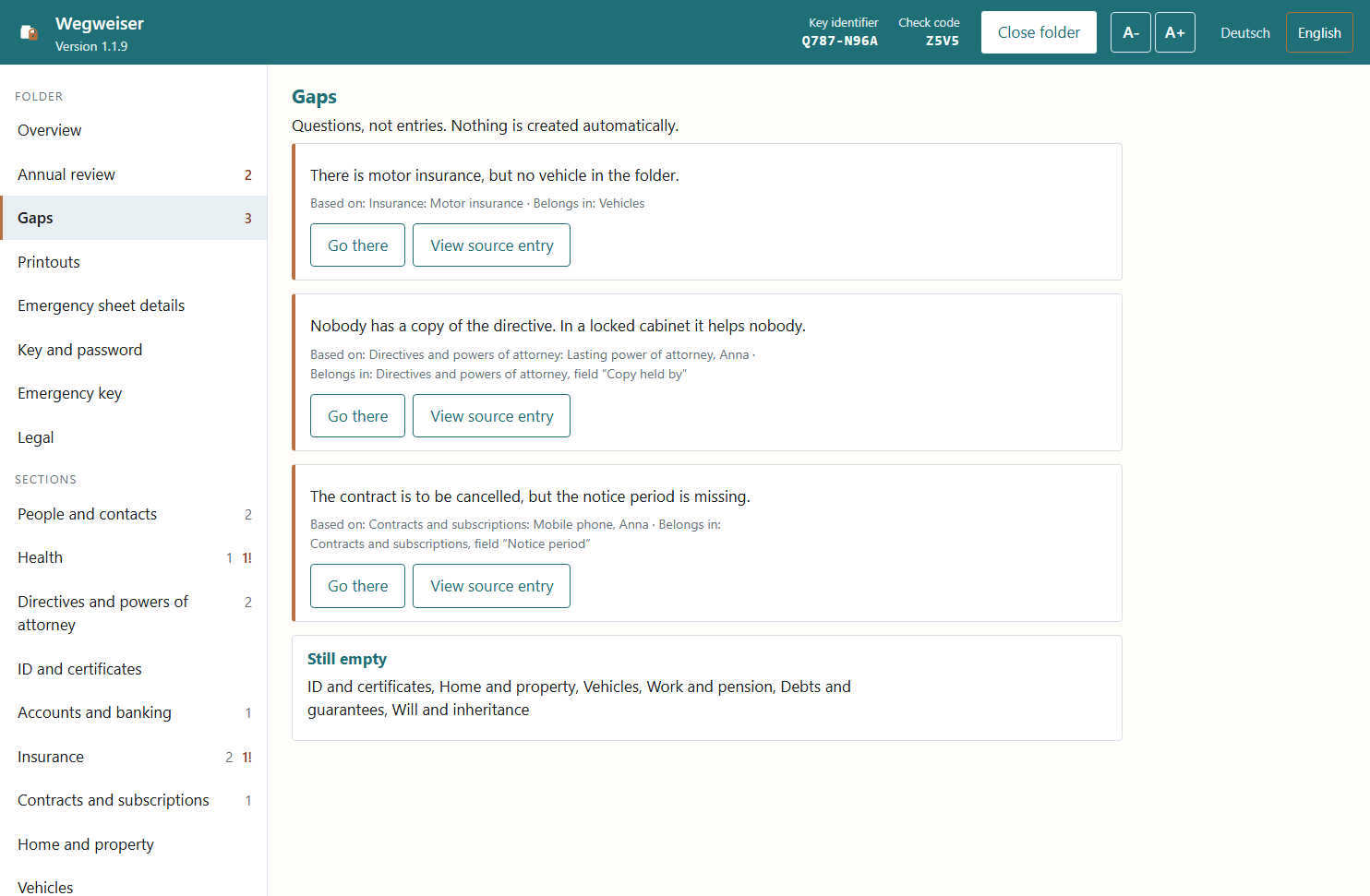
Every note says where it comes from. All details are made up.
The complete folder for filing
You can print all areas as a folder. A check code shows how up to date the pages are.
- Four printouts: wallet card, emergency sheet, binder and key sheet
- Outdated details appear in the printout as unchecked, with a date
- Printing goes through your browser, on paper or as a PDF
- The interface and printouts are available in both languages. You choose the printout language separately, for example for family members abroad.
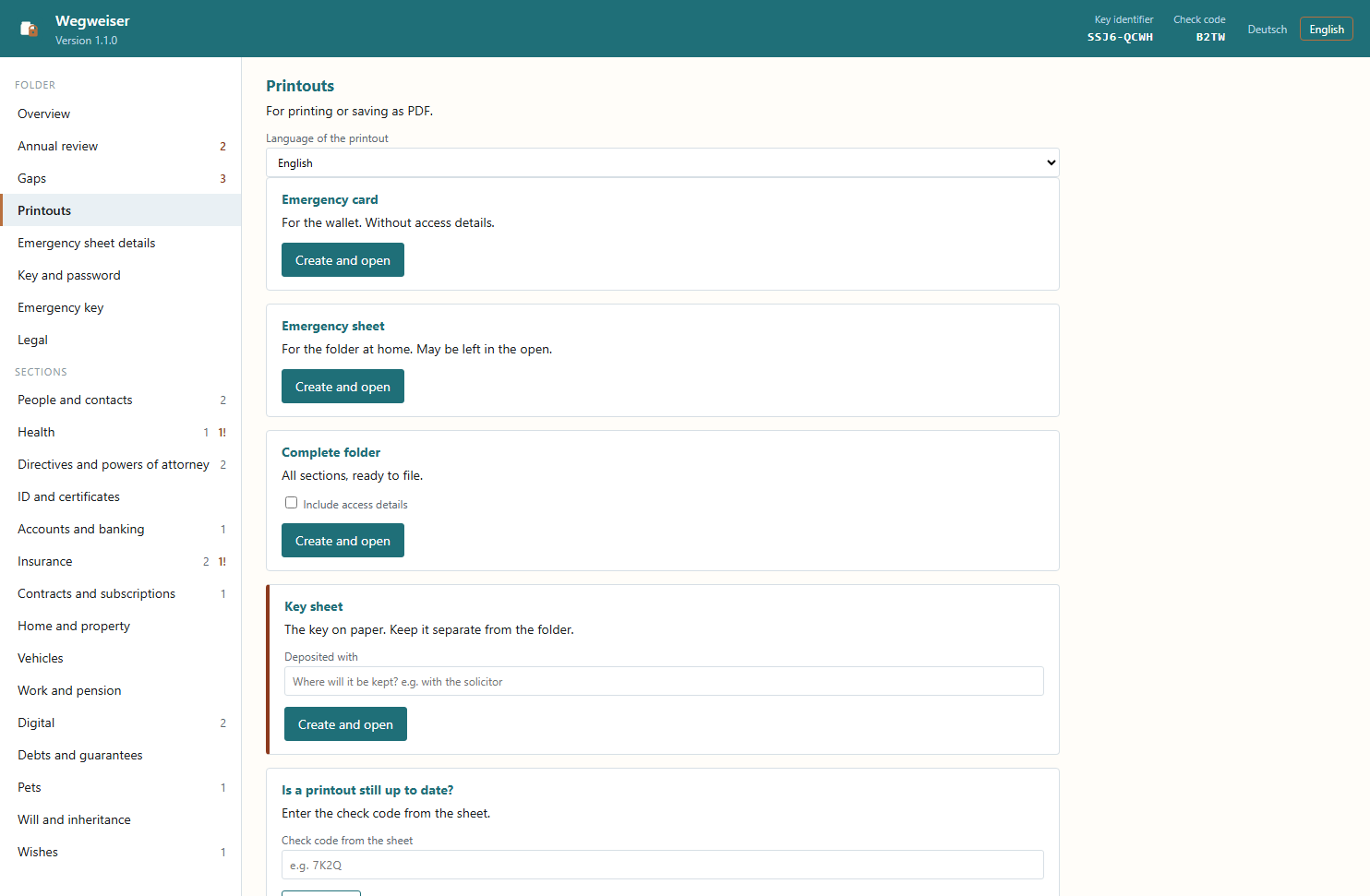
From your details, Wegweiser prints the wallet card, emergency sheet, folder and key sheet.
Wallet card and emergency sheet
Neither printout contains login details, and both can be printed without a licence. Because they include health details, you should not leave them lying around.
- The wallet card is credit-card sized and fits in your wallet
- It says that a folder exists, where it is kept and whom to call
- The emergency sheet sums up what your family needs in the first hour
Check mark 7K2Q · as of 12 October 2026
- Kept at
- Study, left-hand shelf
- Call
- Daughter, 0123 456789
- Blood group
- A positive
- Directive
- Advance directive in place
Look first, then print
Before printing, you see the wallet card and the emergency sheet as a preview, exactly as they will appear on paper.
- The card says where the folder is kept, whom to call, blood group, allergies and directive.
- The emergency sheet starts with what to do first and then says where everything is.
- Details that have not been confirmed for a long time are marked as unchecked.
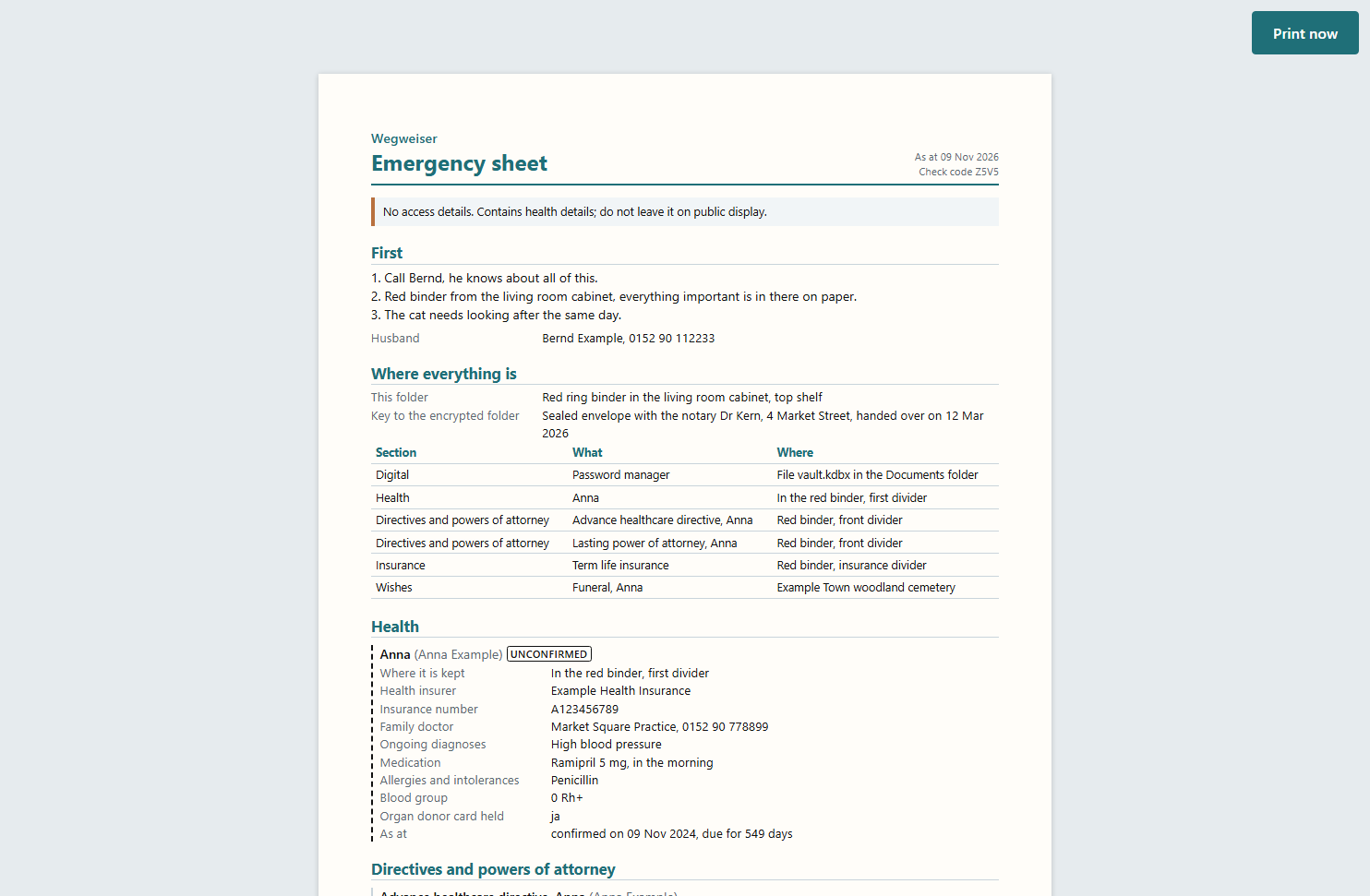
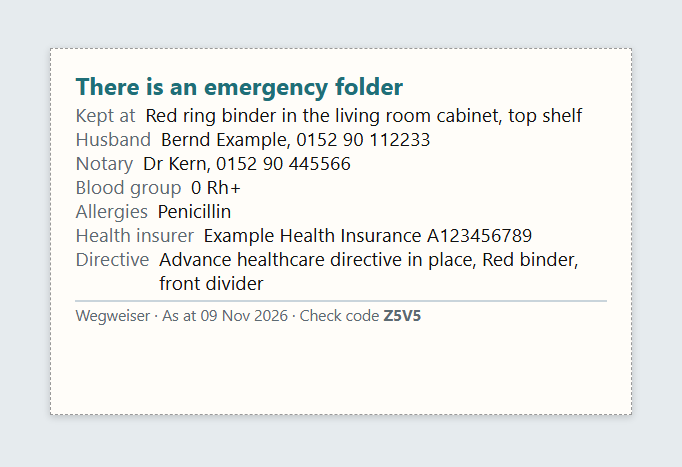
The emergency sheet at the top, the wallet card below. All details are made up.
How Wegweiser protects your details
Your folder only opens with your password or with the key sheet, a printed spare key.
- The folder and its previous version are only ever stored encrypted on your computer.
- Don't keep the key sheet next to your computer. Keep it somewhere else, for example in a safe deposit box or with someone you trust.
- If you change your password, the key sheet stays valid.
This sheet opens your folder if the password is missing.
Keep it away from the computer, for example in a safe deposit box.
Change your password at any time
Under “Key and password” you change your password. Key sheets you have deposited stay valid.
- You enter the new password twice and can show it while typing.
- It needs at least 10 characters; three or four words work best.
- “Compare” checks whether a deposited key sheet still fits the folder.
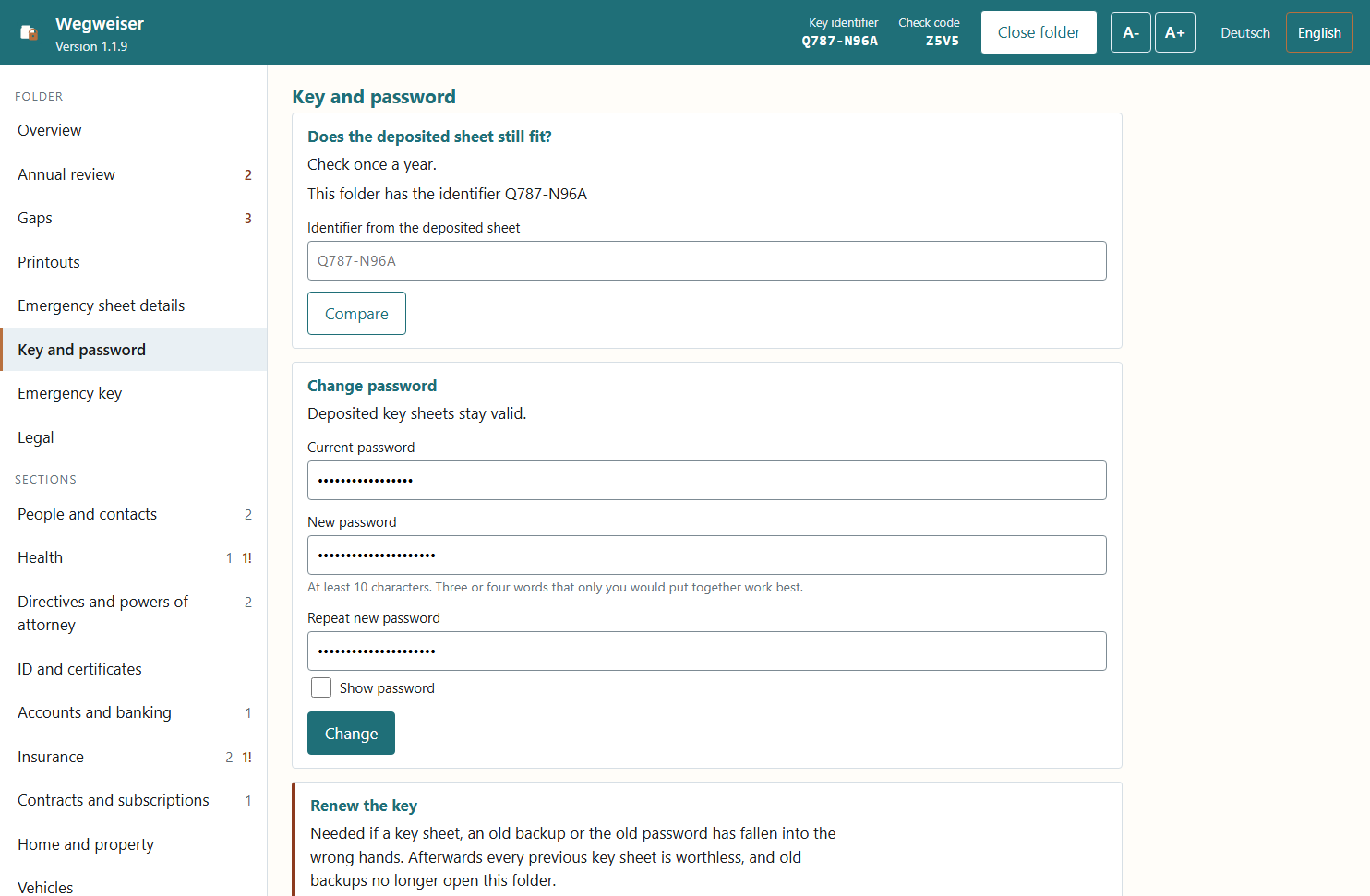
A new password does not need new key sheets.
If you lose both the password and the key sheet, the contents cannot be recovered.
As long as no emergency key has been set up, nobody can open the folder without the password or key sheet, not even Timo Britz.
Emergency key for relatives
With the emergency key, people you name can apply to have your folder unlocked after your death, even without the password and key sheet. Using it is entirely optional.
- The emergency key is switched off by default. Switching it on and off in the program costs nothing.
- You name up to two trusted people with their name and place of residence.
- The folder stays on your computer. Timo Britz does not receive it.
- In an emergency, the named person needs three documents: the emergency key, a certified death certificate and their own ID.
- A seven-day waiting period then applies. During this time, heirs can object.
- Each unlock costs €49. It is paid in advance to Timo Britz by invoice and bank transfer.
- There is no guaranteed term for this service. If it is discontinued, this page will say so.
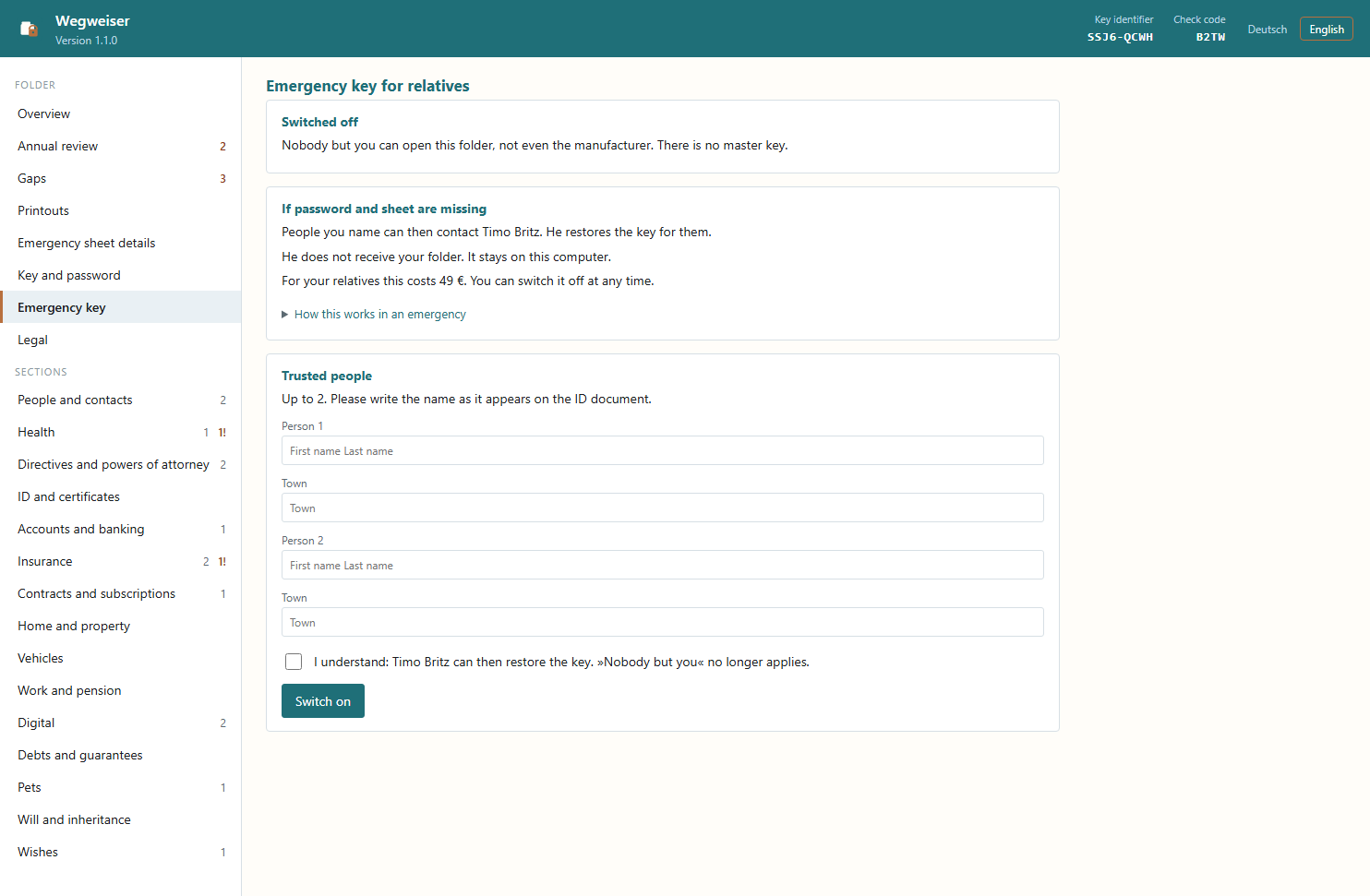
You can enter up to two trusted people and switch the emergency key off again at any time.
How your family gets access to the folder
- 1Switch onYou name up to two people
- 2RequestWith three proofs
- 3Waiting periodSeven days for objections
- 4PaymentBy invoice
- 5Unlock codeBy email
How an unlock works
- The named person writes to info@timobritz.de and encloses the documents.
- If an heir objects, the folder is only unlocked if all heirs agree or a court orders it.
- Once the waiting period is over and payment has arrived, the person receives an unlock code by email. They enter it in the program under “With key sheet”.
- The program then asks for a new password and issues a new key. This uses up the unlock code and every key sheet deposited so far, including the one held by Timo Britz.
What switching it on creates on your computer
The program creates an extra file next to the folder and does not send it anywhere. This file can only open the folder together with a secret key held by Timo Britz.
If you switch the emergency key off, the file is deleted. Sheets you have already printed, however, only become invalid once there is a new data key.
Good to know
Your folder stays on your computer, and you pay only once.
On your PC
Your folder is stored encrypted on your computer, health details included.
Pay once
You pay once; there is no subscription.
Free trial
The trial version holds up to 15 entries.
In English and German
The interface and printouts are available in both languages.
System requirements
Wegweiser prints through your browser, so you can print on paper or save as a PDF.
- Windows 10 from version 1809, or Windows 11, 64-bit.
- WebView2, a display component from Microsoft. It is already installed on Windows 11.
- 58 MB of free disk space.
- You do not need administrator rights.
- Wegweiser works without AI and without a language model.
What Wegweiser cannot do
No legal advice
Wegweiser does not draw up powers of attorney or directives. It records whether they exist and where they are kept.
No medical advice
You enter your health details yourself.
Print quality of the wallet card
How cleanly the wallet card prints depends on your printer. This cannot be guaranteed for every device.
No independent security audit
The program's security has not been reviewed by an independent party.
Privacy
Wegweiser itself sends no data to the internet. You don't need an account, there are no usage statistics (telemetry), and your folder is never transmitted.
- Not encrypted: the licence certificate with name, email and licence number, and the printouts.
- Printouts with login details are saved by the program in the “Vertraulich” (confidential) directory. They stay there until you clear them in the program.
- For its display, Wegweiser uses Microsoft WebView2. It switches off every WebView2 request that can be switched off. A connection to Microsoft still remains.
- New releases are published on this page. The program does not check for updates itself.
- One connection stays on your computer: During setup, the program checks whether a language model is running on the PC. No data from the folder is sent in the process.
You will find all the details in the privacy policy.
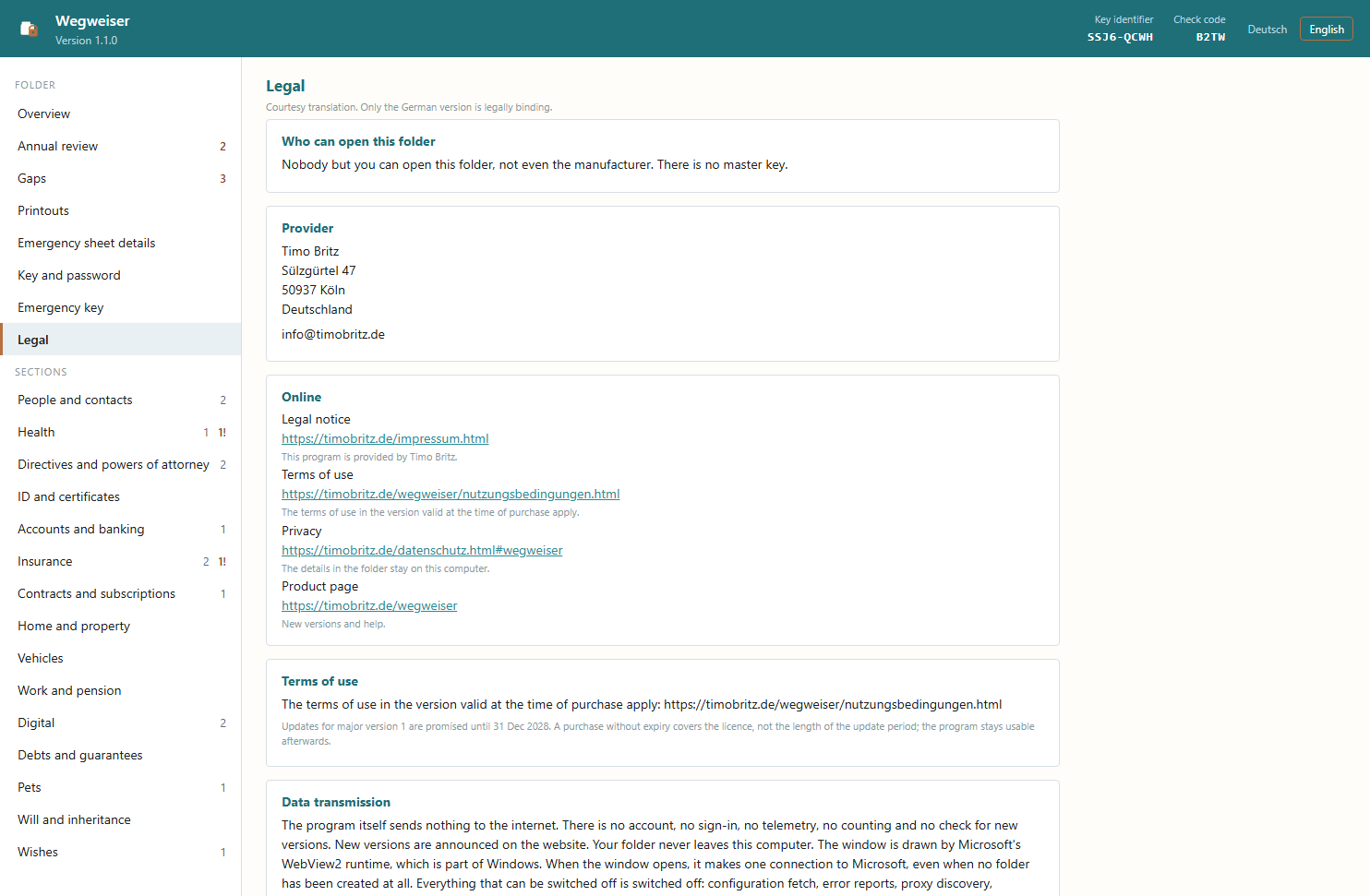
The program's legal section names the provider and the terms.
Price and licence
You pay once and need neither a subscription nor an account.
You can try it free of charge before buying.
- The licence covers all 1.x releases.
- You receive updates as required by law.
- No activation is needed.
- The emergency key is optional; each unlock costs €49.
If you lose both the password and the key sheet, the contents cannot be recovered.
Wegweiser is not legal advice. It does not draw up powers of attorney or directives.
Note: Only the German version of the terms of use is legally binding. German law applies whatever the interface language.
You can print the wallet card and emergency sheet without a licence.
How the trial version works
Without a licence, you can create up to 15 entries. Even after that, you can still view and export your details.
The licence certificate
The program checks the licence certificate without an internet connection. Until you have added it, Wegweiser runs as the trial version.
Download
A single installer contains both the trial and the full version. You unlock the full version with the licence certificate.
Wegweiser 1.1.9
For Windows 10 and 11, 64-bit.
SHA-256: 41c689d7059bbfb15340374be77965e3f50a88609eaf1fba43db187a393bd19c
Where the program stores its files
If you uninstall Wegweiser, your folder is kept.
The directories in detail
- Program
%LOCALAPPDATA%\Programs\Wegweiser - Data
%APPDATA%\Wegweiser
The program is not digitally signed. That is why Windows SmartScreen shows a warning on first launch. Click “More info” and then “Run anyway”.
On a newly set-up Windows 11 PC, the Smart App Control feature may prevent the program from starting.
What has changed in each release
- 1.1.9
-
9 November 2026
“Buy licence” and the links under Legal open the website again. Opening the folder twice no longer loses entries, and the program restores a damaged folder from its previous version.
- 1.1.8
-
23 October 2026
Licence certificates that only serve to test the shop connection no longer unlock the program.
- 1.1.7
-
22 October 2026
All licence texts are included, the emergency sheet and card point out that they contain health details, and the licence line shows when the allowance is used up.
- 1.1.5
-
16 October 2026
The program now says where to get a licence and what to do first after creating a folder.
- 1.1.4
-
6 October 2026
In the English interface, the links now lead to the English pages.
- 1.1.3
-
6 October 2026
Removing the old data directory no longer deletes a folder along with it. The notice about the old directory stays visible.
- 1.1.2
-
1 October 2026
An unlock code is used up once it has been used. Saved printouts can be cleared, and there is a “Close folder” button.
- 1.1.0
-
30 September 2026
The interface and printouts are now also available in English. The printout language can be chosen separately.
- 1.0.3
-
30 September 2026
The wallet card lists the advance directive again; folders from older releases open fully again.
- 1.0.2
-
29 September 2026
Shorter, clearer texts in the program and on the printouts.
- 1.0.1
-
29 September 2026
Texts and printouts were corrected. The licence certificate now arrives automatically after purchase.
- 1.0.0
-
29 September 2026
The first release, with 15 areas, the printouts and the optional emergency key.
Contact
If you have questions about the program or the licence, please use this form.
- Provider
Program and licence: Timo Britz, Cologne. Address and legally required details are in the legal notice. When buying via Digistore24, the seller is the Digistore24 group company named in the order form.
- Purchase
You buy via Digistore24 using the “Buy now” button in the price box.
- Emergency key
Each unlock costs €49 and is invoiced and paid directly to Timo Britz.