
Price and licence
Pay once, no subscription.
Can be tested in trial mode before purchase.
- All 1.x releases with no expiry date
- Updates until at least 31 December 2028
- Licence check without internet
- No activation, no account
Purchasing will be available shortly.
Note: the program's interface is available in German only. Only the German version of the terms of use is legally binding.
The marks never depend on the licence.
Without a licence
Without a licence, two courses can be created, with no time limit. All other functions always remain available.
New major version
A later major version 2 would have to be bought again. The purchased version keeps working.
Working out report grades
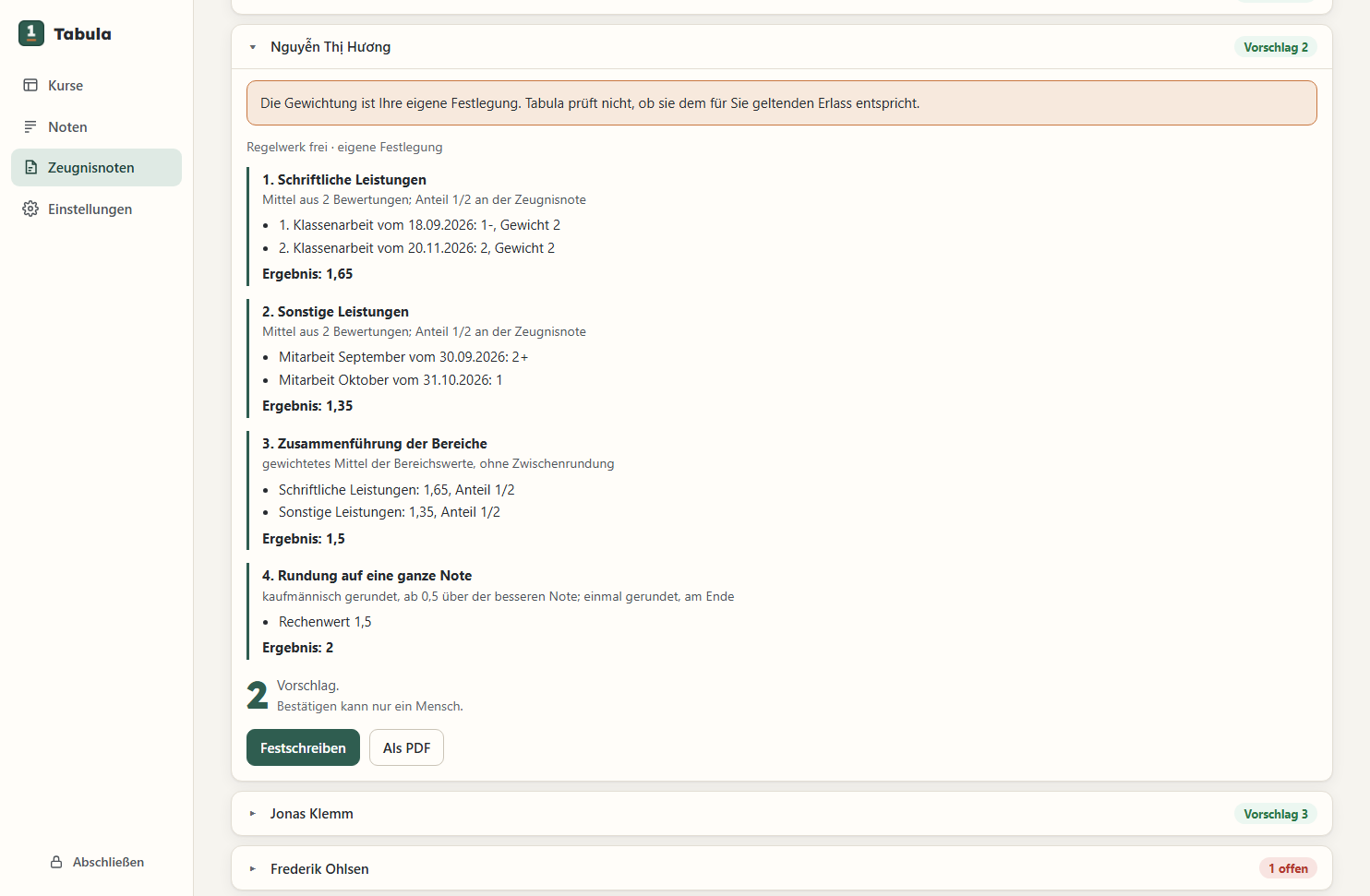
Tabula makes a proposal. The teacher makes the decision.
-
01
Calculation on view
Next to the proposal are all pieces of work, their weights and every step of the calculation. If something is missing, Tabula says so and does not calculate.
-
02
Rounding once
Tabula rounds only at the end. The intermediate results stay exact.
-
03
Missing work
A missing piece of work does not count as a fail. Excused and exempt are left out. For “not submitted” or a pending re-sit, the teacher decides.
-
04
Confirming
A report grade only counts once the teacher confirms it. If it differs from the proposal, Tabula stores the teacher's reason.
-
05
Weighting
The teacher sets the weighting. Templates for some German states are included. They follow the regulations but are not officially checked.
-
06
Students joining or leaving
Tabula takes into account when a student joined or left the course.
Data on the teacher's own computer
Tabula stores all data encrypted on the teacher's computer.
Password and key
The data is protected by a password. If it is lost, the recovery key helps.
Nothing is sent
Marks and names do not leave the computer.
Daily backup
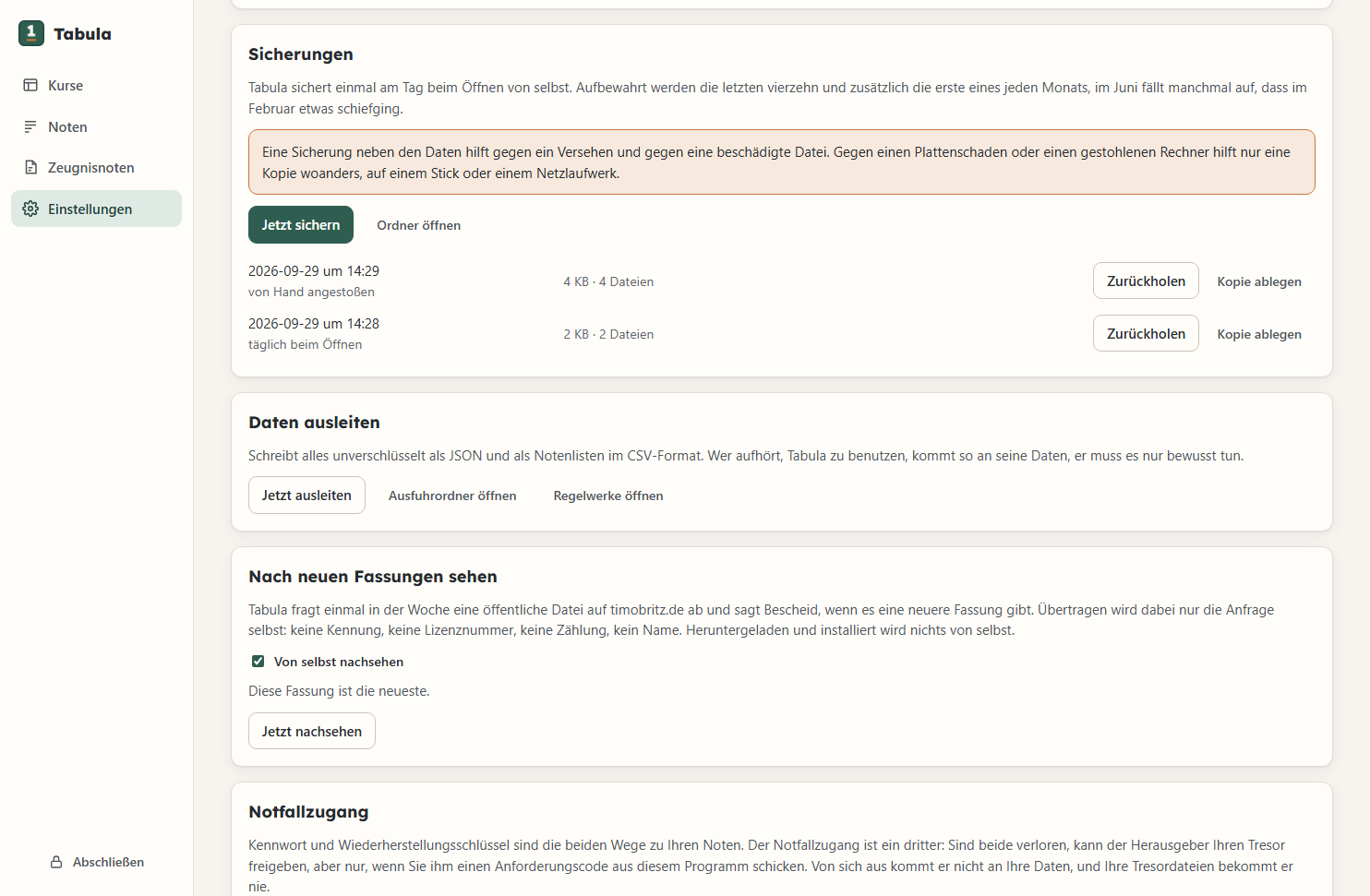
Once a day Tabula creates an encrypted backup. It keeps the last 14 and the first of each month.
Automatic lock
After ten minutes without input, Tabula locks itself. The password is then needed again.
Readable without Tabula
An included reader script opens the data even without Tabula.
Without the password and the recovery key, the data cannot be opened. The exception is emergency access, if the teacher has switched it on. So print the recovery key and keep it away from the computer.
Emergency access
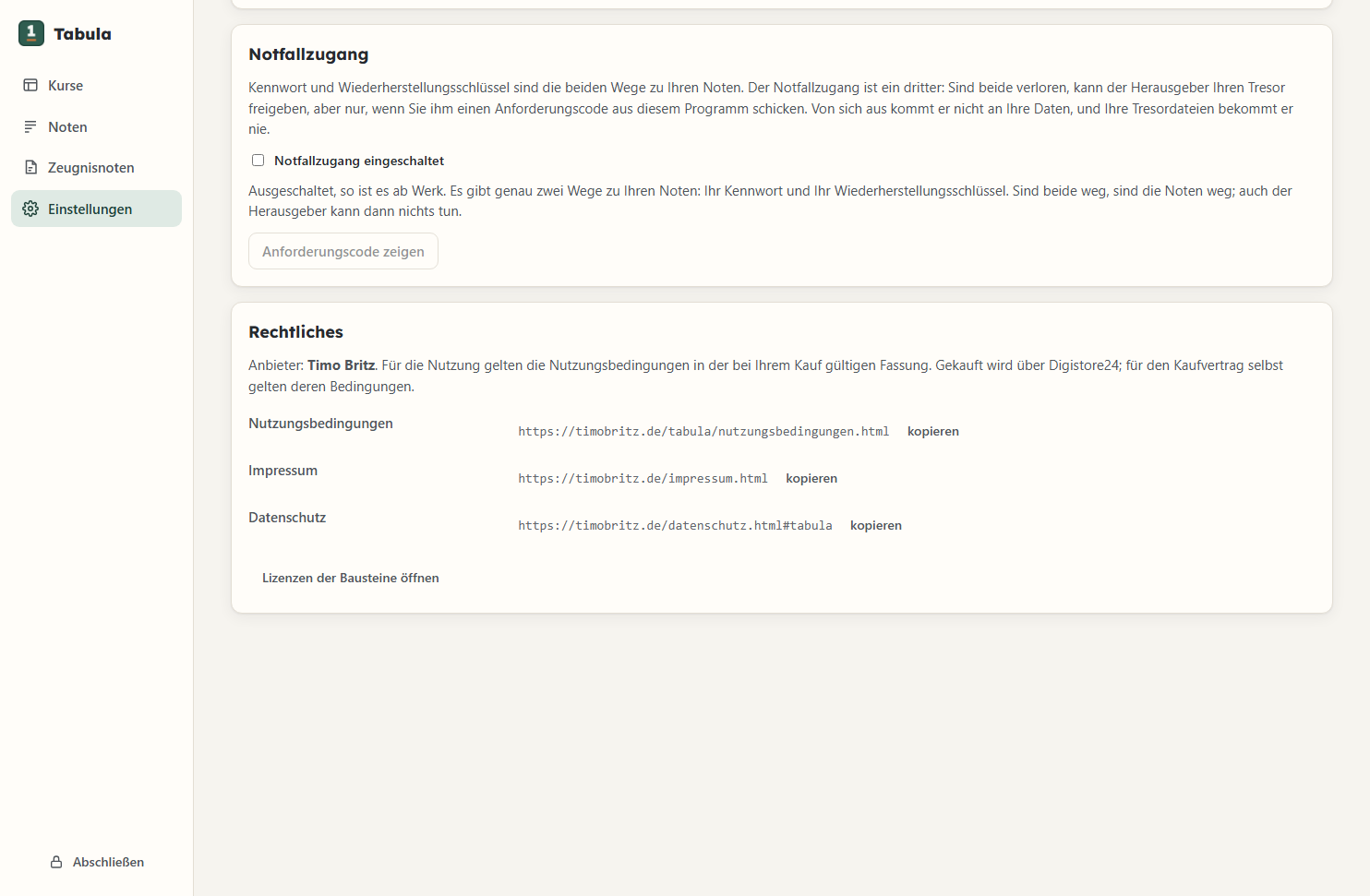
Emergency access helps when the password and the recovery key are both lost. It is switched off by default.
- Switching it on and off is up to the teacher alone, at any time in the settings.
- In an emergency Tabula shows a request code. The teacher sends it to Timo Britz.
- Release: Timo Britz checks the person's identity and sends a release word. It works only once.
- Afterwards the teacher chooses a new password and receives a new recovery key.
- No student data: The code contains no names or marks. Without it, Timo Britz cannot open anything.
- Check first: Emergency access is a third way into the data. The teacher checks with the school whether it is allowed.
Details are in the terms of use and in the privacy policy.
Data protection and schools
Whether student data may be processed on a teacher's own device is decided by the state and the school. Tabula does not make this check.
Description for the head teacher
At the press of a button, Tabula creates a PDF for the head teacher. It describes which data is processed and how it is protected.
Timo Britz receives no student data. A data processing agreement is therefore not needed.
| What | Where to |
|---|---|
| Marks, names, remarks | nowhere |
| Update check | at most once a week to timobritz.de, with the IP address only; can be switched off |
| Licence check | without internet |
| Licence | stored unencrypted on the computer, with the buyer's name and e-mail address |
Details are in the privacy policy.
In everyday school life
Built for one teacher on one computer.
-
01
Mark table
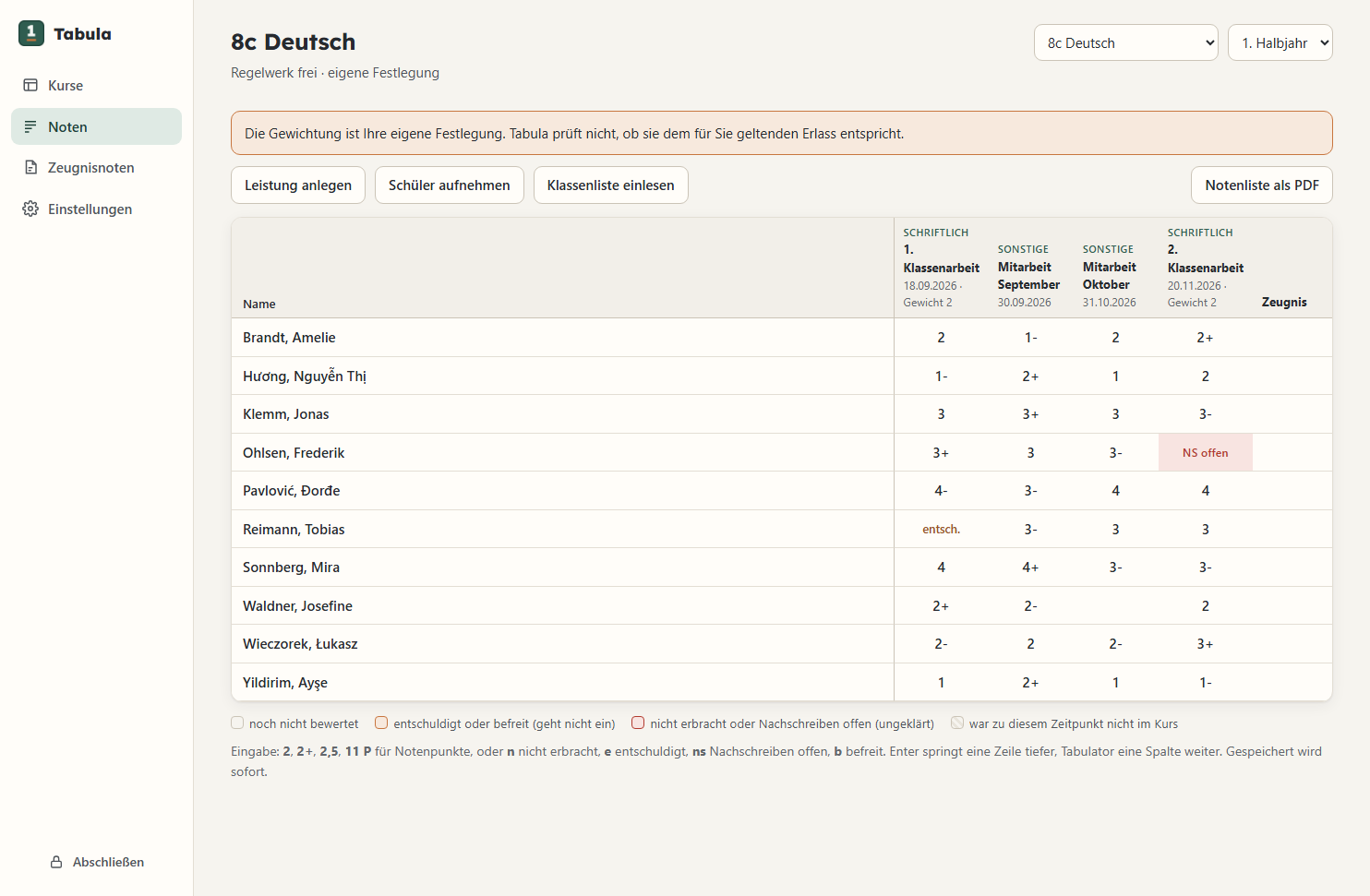
Marks are typed straight into the table. The class list comes from a CSV file.
-
02
Names with special characters
Names such as Nguyễn, Łukasz or Ayşe are printed correctly. If the font lacks a character, Tabula says so.
-
03
Sheets as PDF
Report grade sheet and mark list as PDF, one page per student.
-
04
Export
All data can be exported as CSV and JSON at any time.
What Tabula cannot do
No legal advice
Tabula only makes proposals. The teacher is responsible for every grade.
Not a school management system
No shared access for several people, no connection to school administration software.
No report comments
Tabula contains no language model and does not write comments.
Backup on another drive
The backups are on the same hard drive. A copy elsewhere is up to the teacher.
Windows only
Tabula runs only on Windows 10 and 11.
Not yet included
Grading scales for single tests, absences, conduct grades, seating plan and mark statistics.
Download
One file for trial mode and full version.
SHA-256 of the file: 6450d26da49cff80280fc974cf5ef89c52c3da4cb89dcf066f9c793d88d07800
The program is not signed, so Windows shows a warning on first start (continue with “More info” and “Run anyway”).
System requirements
- Windows 10 from version 1809, or Windows 11, 64-bit.
- WebView2 from Microsoft, already included in Windows 11.
- No administrator rights needed.
- About 70 MB of disk space.
- No internet needed for trial mode and licence check.
Releases
- 1.2.1
-
29 September 2026
The interface is now chalkboard green.
- 1.2.0
-
29 September 2026
Klassenwerk is now called Tabula. Existing data is moved over automatically.
- 1.1.1
-
29 September 2026
New: emergency access. It is switched off by default.
- 1.0.0
-
28 September 2026
First release.
Storage locations
- Program
%LOCALAPPDATA%\Programs\Tabula - Data
%APPDATA%\Tabula
Uninstalling keeps the data.
The reader script is in the program folder, in the subfolder “Notfall”.
Buying and questions
Purchasing will be available shortly. Questions can already be sent using this form.
Purchase details
- Provider
Program and licence: Timo Britz, Cologne. Address and mandatory details are in the legal notice. When buying via Digistore24, the seller is the Digistore24 group company named in the order form.
- Price
€29 once including VAT.
- Delivery
The licence arrives by e-mail, at the latest two working days after payment.
- Withdrawal
Digistore24's cancellation policy applies. Consumers can withdraw within 14 days, even after receiving the licence.
- Terms
Usage rights and liability are set out in the terms of use.