Inventory · Till · Online retail · On request

Kontor: inventory management for retail

The complete solution for specialist retail: till, service and online sales in one system.

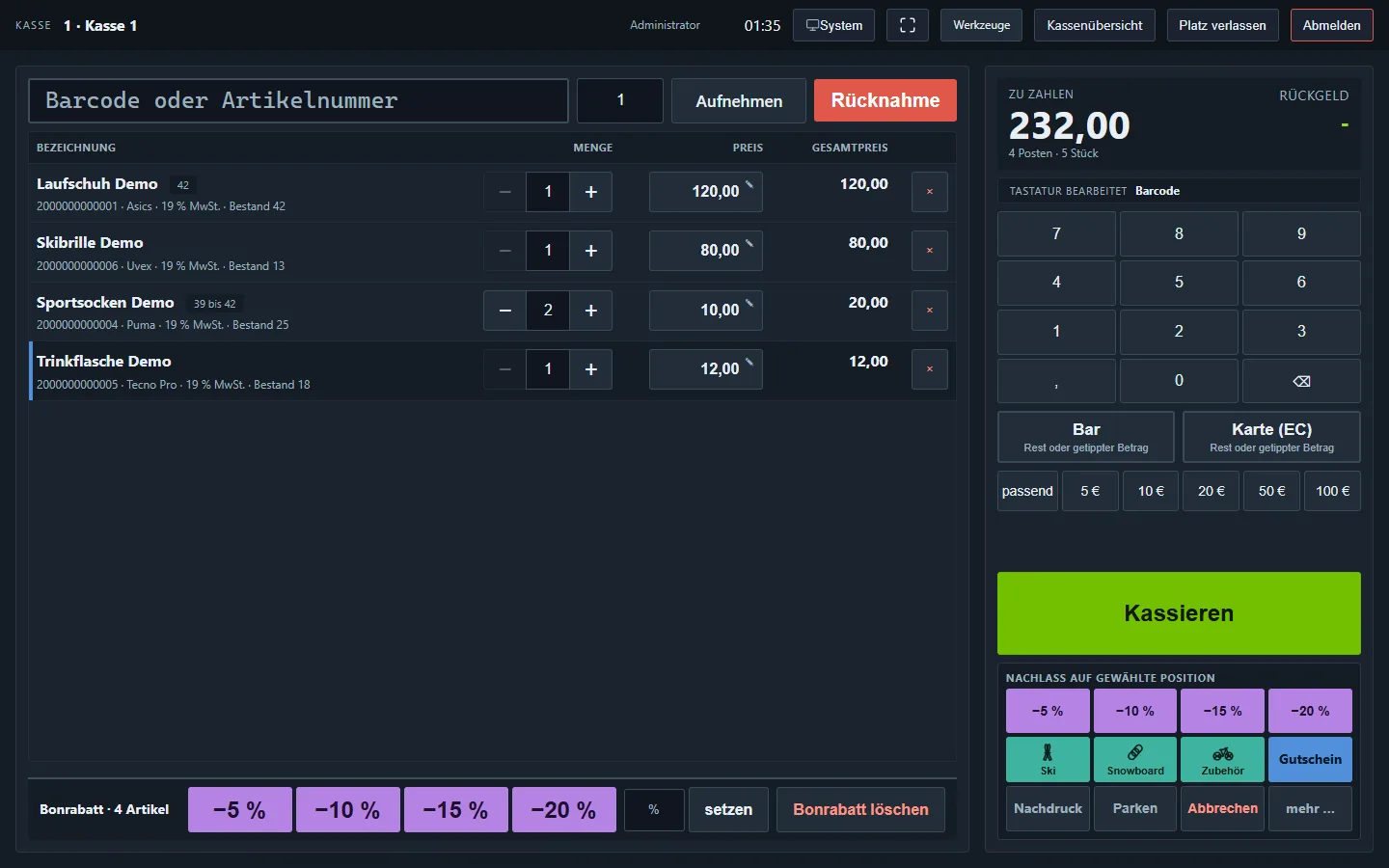
Kontor till screen with test data: basket with four lines, total, keypad, payment methods and the Check out button
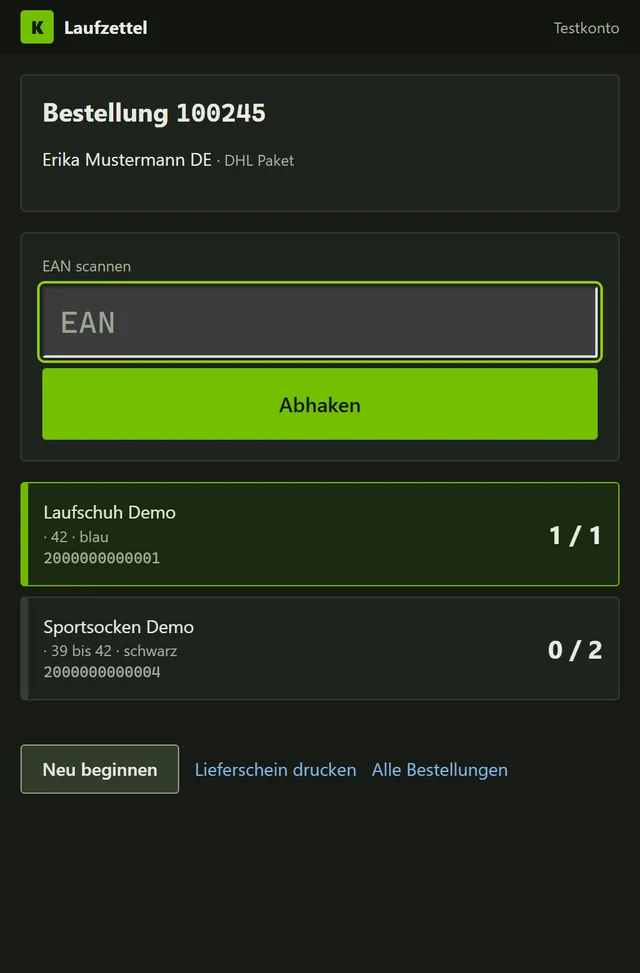
Packing checklist on a phone with test data: one order, one item ticked off, one open

All images on this page show test data. The screens are in German.
Everything in one program

Each area has its own screen in Kontor, and all of them share the same products, customers and documents. What sells in the shop disappears from the web store straight away.

Home screen

The day at a glance

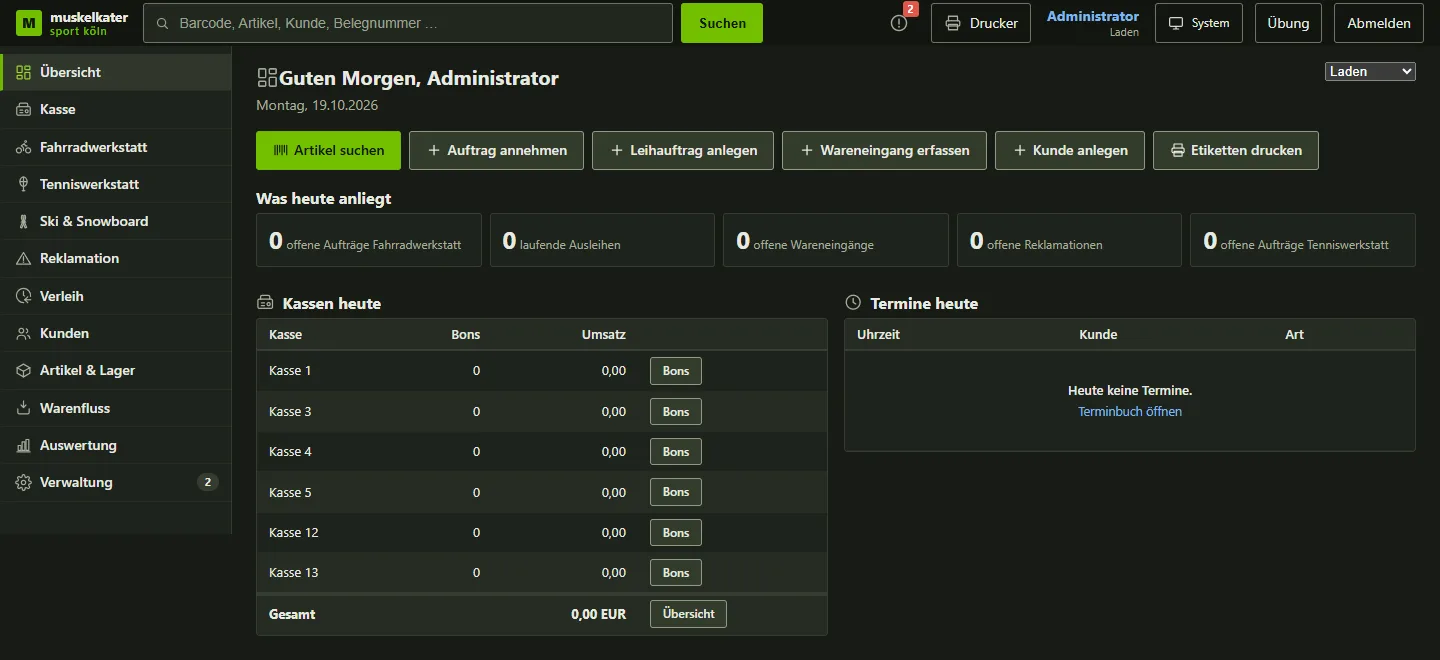
After logging in, Kontor shows what is due today: open jobs, appointments, orders and the day's tills. One click and you are right in your work.

  • Shortcuts to the most common tasks
  • A bell flags whatever needs attention
  • Each employee sees only their own areas
Kontor home screen with test data: shortcuts, open tasks and today's tills
Till

Checkout on a touchscreen

Large buttons, clear totals and receipts signed by the TSE. The till is built for the counter and stays clear even on a busy Saturday.

  • Scan, search or tap a quick key to add items, park a sale and continue later
  • Cash, card and gift card, also mixed in one purchase
  • Returns via the barcode on the receipt, always at the price paid at the time
  • End-of-day closing with count sheet and Z report

How a sale works

  1. 1Add itemsScan or tap
  2. 2PayCash, card or gift card
  3. 3SignThe TSE signs the sale
  4. 4ReceiptWith all mandatory details
  5. 5ClosingCount in the evening, print the Z report

Signing unit down: you keep selling, and the outage is noted on the receipt.

Returns, gift cards and receipt printing
  • The barcode on the receipt opens the original purchase. Goods are taken back at the price paid at the time, and never more than the quantity bought.
  • Top-up gift cards keep their number. The current balance is what gets redeemed.
  • Only one receipt is printed at a time. If it is unclear whether printing worked, the till asks rather than printing the receipt twice.
Card payments and returned goods
  • During a card payment the till shows a large status card: payment running, successful, cancelled or no connection.
  • If the card terminal has already charged the card and the receipt fails, the till remembers the payment. That way the card is not charged a second time.
  • The cashier decides on returned goods during the end-of-day closing. The closing only continues once every item has been decided.
  • Staff can only open the till screen on devices approved as tills.
Devices at the counter

A small Windows service on the till computer drives the receipt printer, cash drawer, customer display and label printer. It reports to Kontor and updates itself. Without it, the browser prints as usual.

Signing and backing up till data
  • The TSE is a Swissbit Cloud-TSE 2, certified by the German Federal Office for Information Security (BSI). There is no public interface specification, so the integration follows an open-source connector.
  • The TSE keeps its data for only 30 days. That is why a nightly job verifies the export, stores it in the archive and only then deletes it on the TSE.
  • Kontor takes the serial number, certificate and key directly from the TSE.
Online retail

Online retail in one place

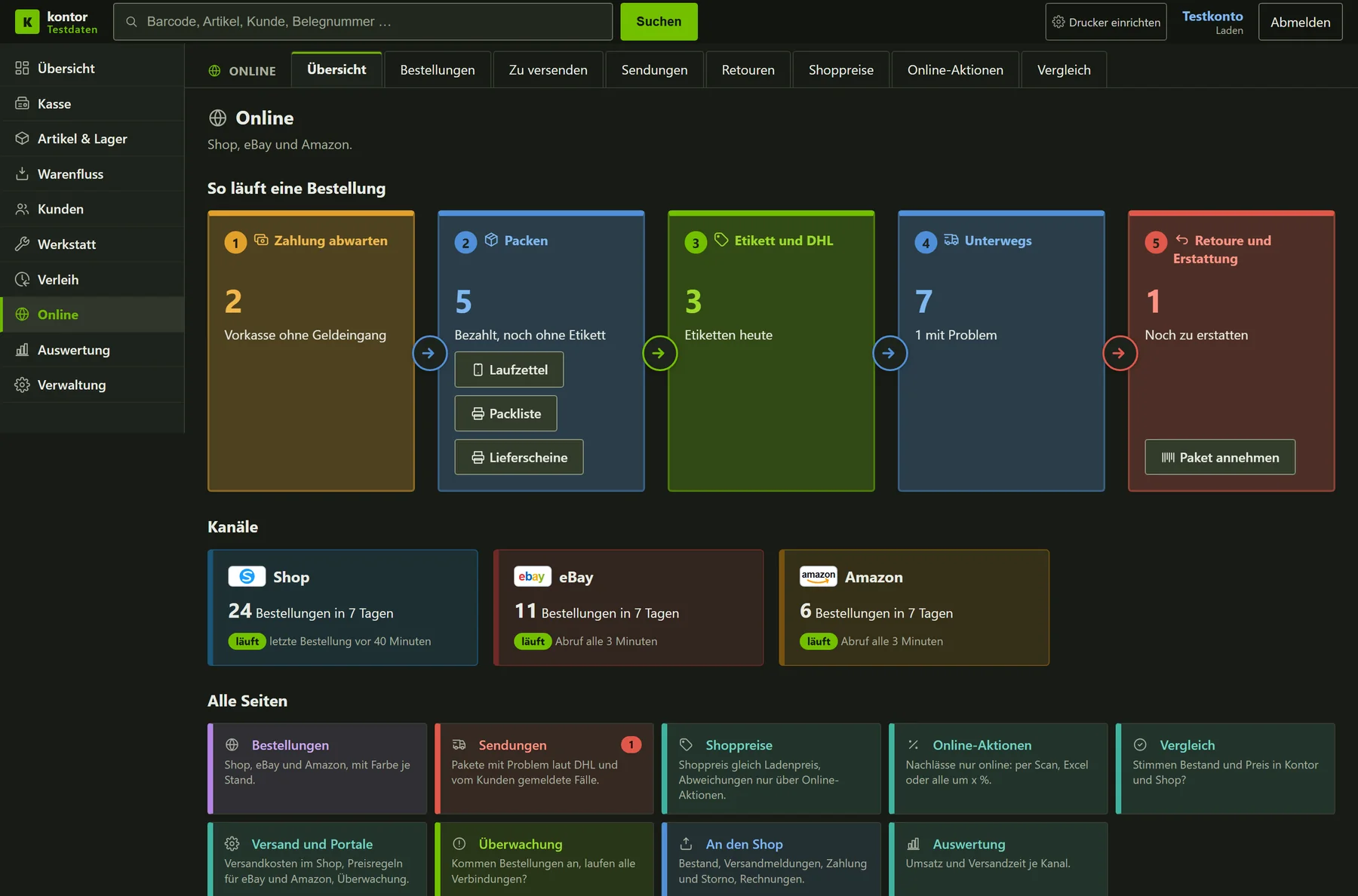
Orders from your web store, eBay and Amazon arrive in Kontor every three minutes. That is where they are packed, the DHL label is printed and returns are accepted. The shop and the web store share one stock.

  • One overview shows what is paid, what needs packing and what is on its way
  • Pick list on paper or a checklist on the phone, every item ticked off by scanning
  • DHL label in one click, straight to the label printer at the packing table
  • Scan the return, check the goods, refund the money, never twice
Kontor online overview with test data: five coloured steps from payment to return, below them the channels web store, eBay and Amazon

How an online order works

  1. 1OrderFrom web store, eBay or Amazon
  2. 2PaymentOnline at once, prepayment by button
  3. 3PackingPick list or checklist on the phone
  4. 4LabelDHL, domestic and EU
  5. 5ShippedThe tracking number goes to the customer

Prepayment open: reminder after 4 days, cancellation after 7 days.

Return: scan the parcel, check the goods, refund.

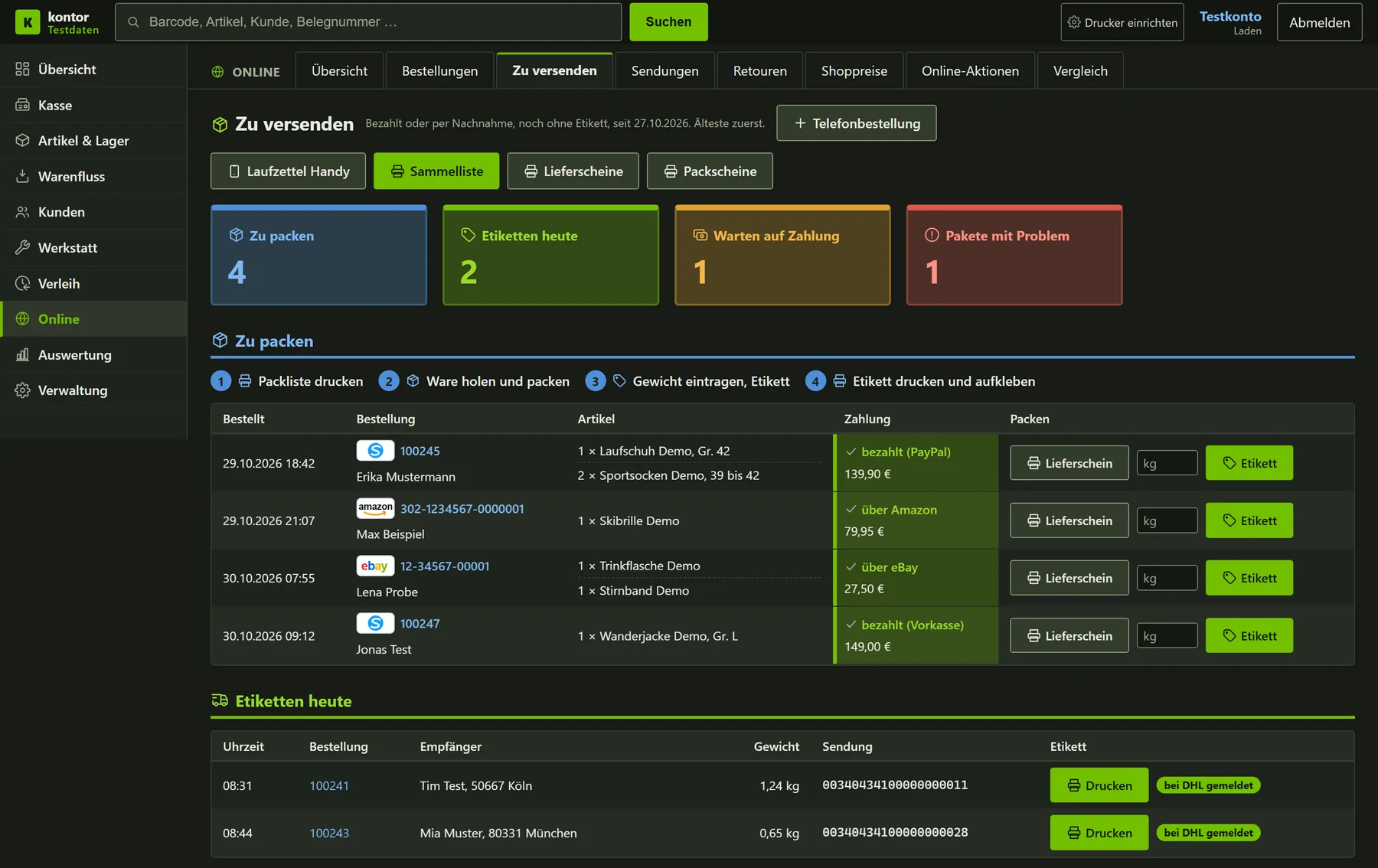
To-ship screen with test data: four orders with items, payment status, weight and the button for the DHL label
Everything going out today, with the label right in the row.
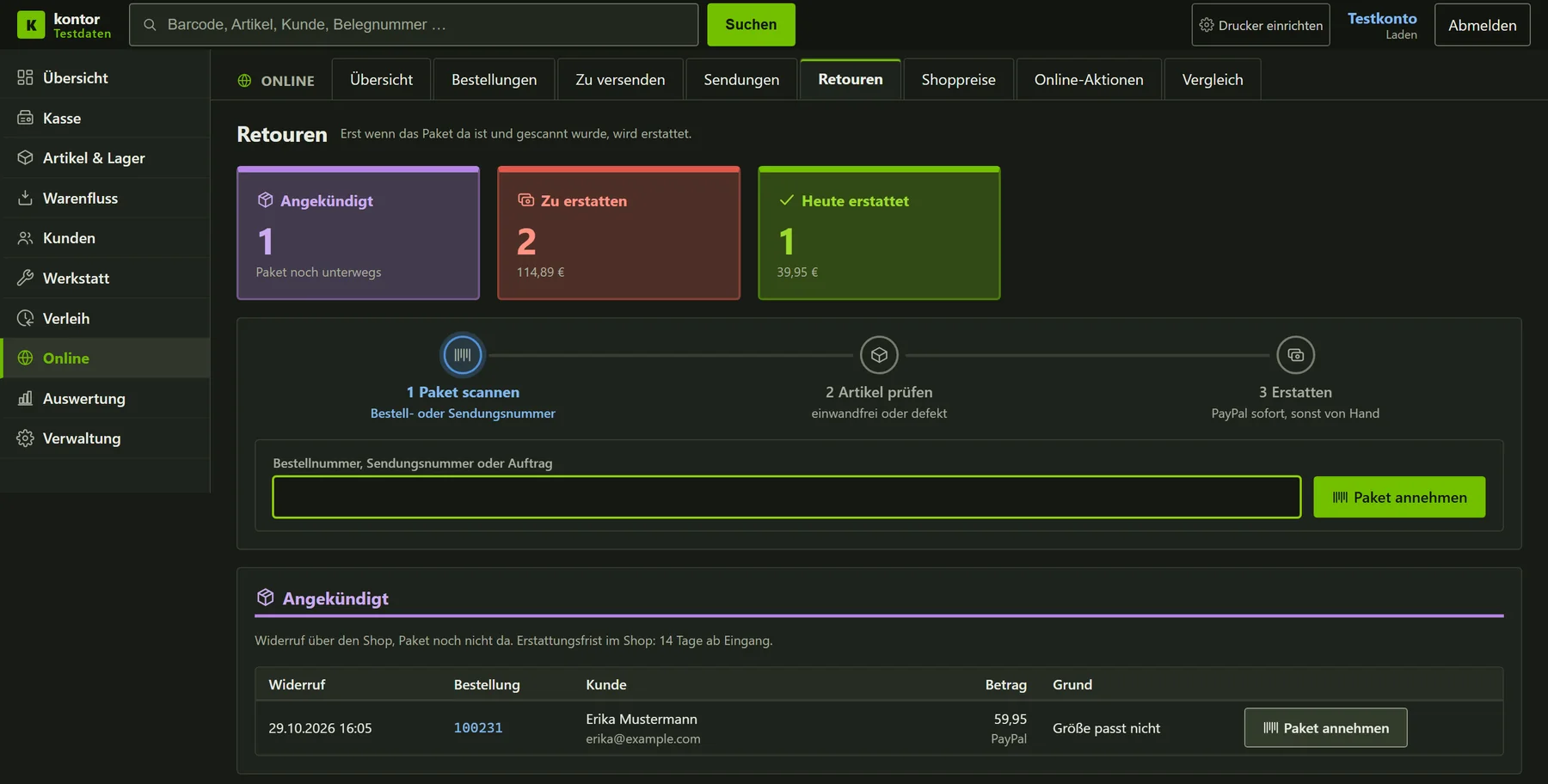
Returns screen with test data: announced return, refunds with deadline and a scan field for accepting parcels
Returns with the refund deadline for each marketplace.
Stock and prices
  • Kontor keeps one stock for the shop floor and online. When the shop sells an item, the stock in the web store goes down too.
  • Only what has changed since the state the web store last confirmed is sent.
  • Kontor calculates the web store price from the shop price. A price at or below the purchase price is never sent to the web store.
  • Price promotions for the web store are set up in Kontor. A web store price is only lowered within such a promotion.
  • Prices for eBay and Amazon follow a fixed rule that Kontor recalculates and checks itself.
Packing, labels and shipping
  • Everything that is paid for or sent cash on delivery is ready to pack. The pick list shows each item with size and colour and whether it is still on the shelf.
  • On the phone, the packing checklist is ticked off by scanning. Delivery notes have their own number range, and a reprint keeps the number and date.
  • Kontor creates the DHL label itself, including for parcels to other EU countries. It prints straight to the label printer at the packing table. A misprint can be cancelled with DHL on the same day.
  • The tracking number goes to the web store, and the customer gets the shipping email from the store as usual. Kontor does not pass the customer's email address on to DHL.
  • For prepayment and cash on delivery, a button records the incoming payment. An amount that is too small counts as partly paid, and the order is not packed.
Returns and refunds
  • The web store reports withdrawals to Kontor. They appear as announced in the returns list until the parcel arrives.
  • The sales team accepts the return, checks the goods and decides whether they go back on sale.
  • A refund cannot run twice. It appears as a credit note on the order whose invoice it corrects.
  • If a cancelled or returned order still has an unused shipping label, Kontor reminds staff about it.
  • A marketplace order that has already shipped cannot be cancelled. Kontor points to the return instead and opens the order on the marketplace with one click.
Monitoring, reports and archive
  • The online cockpit shows orders, revenue per channel, open parcels, speed and return rate as charts. The tiles also work as filters.
  • All lists use the same colours: yellow waits for the customer, blue is being packed or on its way, green is shipped, red needs attention.
  • A watchdog checks every interface to the web store and DHL. When one fails or recovers, Kontor reports it in the notification bell and by email.
  • Kontor fetches invoices, cancellations and credit notes from the web store as PDFs and attaches them to the order. For bookkeeping there is a monthly export with totals per channel and payment method.
  • All orders from the previous program are fully backed up in Kontor, including the original invoices. They appear in the same order list as the new ones.
Workshop

Workshop and ski service

Bikes, tennis rackets and skis: every job has a ticket with a barcode, a fixed date and a clear status. In the morning the team sees at once what needs fixing today and who is coming in next.

  • Appointment book with a text reminder the day before
  • Colours show what is overdue, due today or ready for pick-up
  • Every ski gets a label, and a scan opens the job
  • Book spare parts right in the job, no loose paperwork
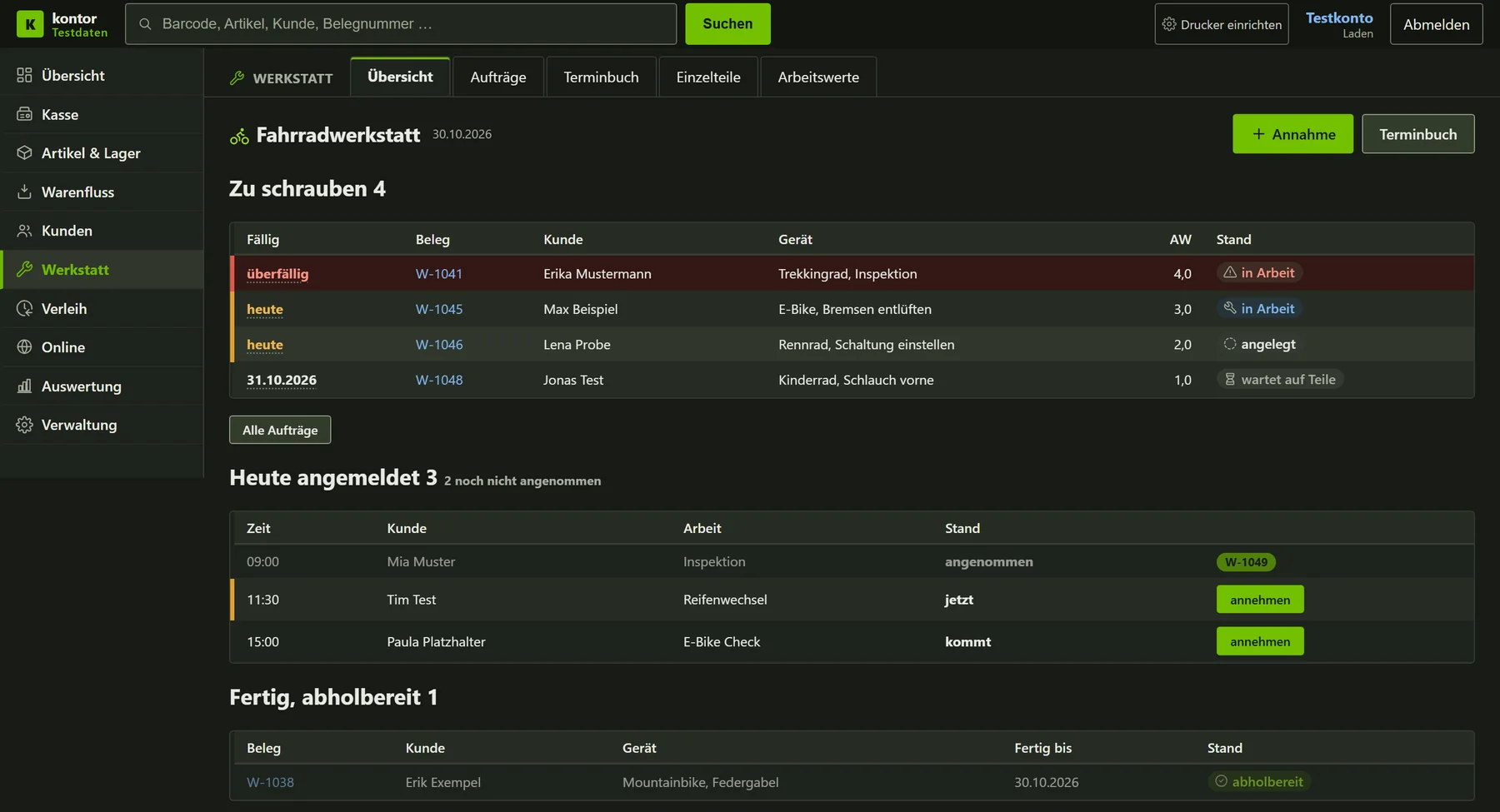
Workshop overview with test data: jobs by due date, today's appointments and bikes ready for pick-up
How the workshop and ski service work
  • The bike and tennis workshops each have their own access rights, their own appointment book and their own receipt printer.
  • When a job is handed in, the customer receives a ticket with a barcode.
  • In the ski service every ski gets a label. Scanning it opens the job.
  • The day before the appointment, the customer gets a reminder by text message.
  • Scanning a ski label, a rental barcode or a job ticket takes you straight to the record, even for completed jobs.
  • In a bike job, spare parts can be booked from a strip below the scan field, without the printed sheet. The workshop sheet shows who accepted the job and who reported it finished.
Rental

Rental with a calendar

Rent out skis, snowboards and boots with a calendar and a rental agreement. When you create a rental, Kontor checks that every item is free for the requested period.

  • Bookings per item at a glance, with today's pick-ups and returns on top
  • Printable rental agreement with a barcode for the return
  • Scanning the rental barcode opens the record
  • The season view shows how busy the coming weeks are
Items and stock

Every item in one place

Size, colour, stock and price for the shop and the web store in one list. Incoming goods, reorders, stocktaking and labels all work from the same items.

  • Incoming goods by scanner, every entry is saved at once
  • Reorder suggestions based on sales and stock
  • Print price labels straight from the item list
  • Stocktaking and interim counts with count lists
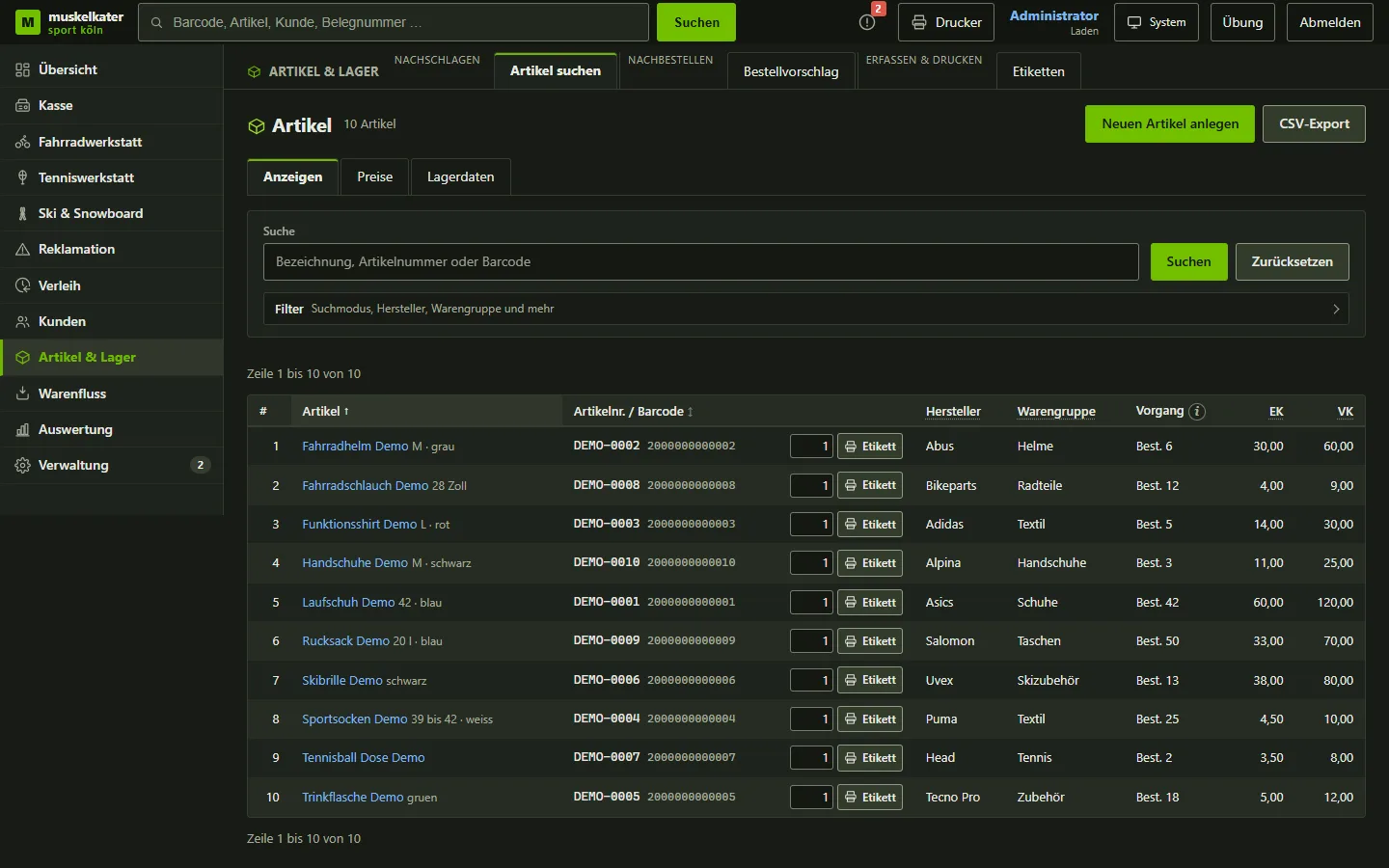
Kontor item list with ten invented demo items, barcodes, brands and prices
Incoming goods and product groups
  • In incoming goods, every entry is saved when you move to the next field. Below the scan field you see the last item captured with its new quantity, size and colour.
  • Product groups follow the web store's category tree. A tool helps to sort items without a group, and every change stays visible in the item's history.
  • Duplicate suppliers can be merged. Before creating a new one, Kontor asks if a similar name already exists.
  • The sales team can use the product search on the phone from any device.
Customers

Customers and loyalty cards

The customer file knows purchases, workshop jobs and rentals. Regular customers get a loyalty card with a discount.

  • New customers sign up themselves, on the tablet in the shop or on their own phone via a QR code
  • Duplicate entries are detected and merged
  • Appointment reminders by text message and messages to customers from Kontor
  • Data protection report for a customer at the push of a button
Phone and tablet

Wherever you are in the shop

Kontor needs no app. In the stockroom, at the packing table or in the workshop, the browser is enough, and the phone camera reads barcodes.

  • Packing checklist for online orders, every item ticked off by scanning
  • The ski service job fits on a phone screen
  • A customer board in the shop uses a traffic light to show whether the ski service is still taking jobs
  • Receipts and labels from the tablet are printed by a service PC
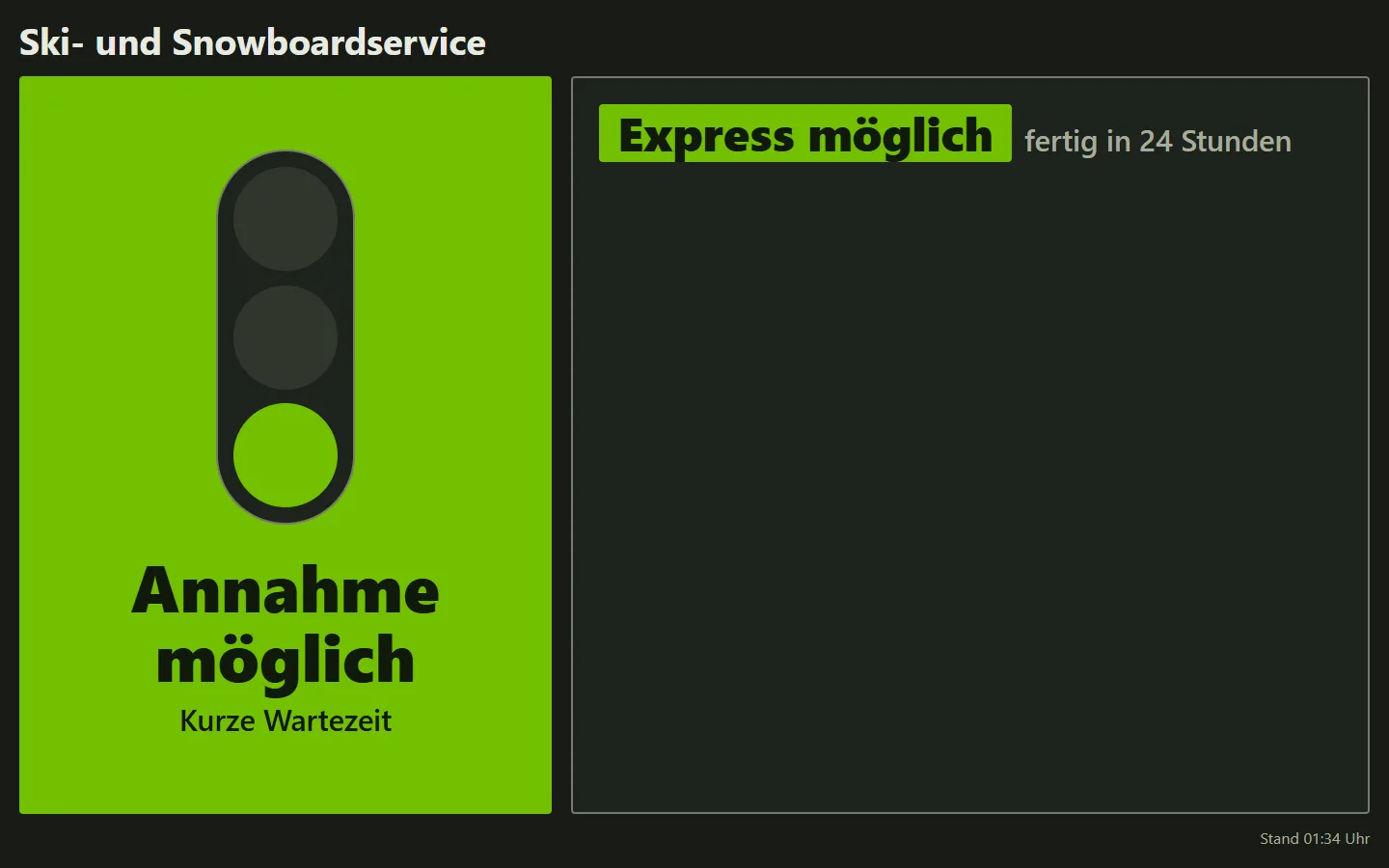
Customer display for the ski service: green traffic light showing drop-off and express available
Packing checklist on a phone with test data: one item ticked off, one open
How tablet, phone and board are connected
  • A Raspberry Pi displays the board from a fixed address. Switching the screen off and on again does not change what it shows.
  • Customers who sign up themselves appear in a separate list, where the team checks them.
  • On the phone, the checklist remembers the scan progress on the device. Nothing is booked in the process.
Security

Secure and traceable

Everything is ready for a tax audit of the till. Booked data stays unchanged, every change is logged, and the data is backed up every night.

Certified TSE

Sales are signed by a cloud TSE certified by the BSI. If it fails, the receipt says so.

Unchangeable

Booked data is only corrected by cancellation, never overwritten.

Backed up every night

Daily backup and yearly archive, TSE data included.

Rights per employee

Everyone sees and changes only the areas they need for their work.

How Kontor supports record keeping
RequirementImplementation
Individual recording § 146a AO Transactions are signed by the TSE and logged.
Failure documentation If the TSE fails, this is noted on the receipt.
Immutability GoBD Booked transactions cannot be changed. Corrections are made only by cancellation.
Proof of integrity GoBD para. 107 ff. A check chain reveals any later change.
End-of-day closing § 146 (1) AO The closing compares expected and actual cash. A difference can only be booked with a reason.
Retention Data is backed up daily and archived every year, and the TSE export is backed up as well.
Mandatory details § 14 UStG All receipts share one layout that contains the mandatory details.
Data protection Access rights are granted per module.

The TSE is certified, not Kontor itself. Whether record keeping is compliant in an individual case is for your business and your tax adviser to assess.

Moving over from the old system
  • For the switchover, a catch-up run pulls all new data from the old system: customers, products, jobs, appointments, rentals, incoming goods, stocktaking and till.
  • Existing data is never overwritten, and running it a second time changes nothing.
  • Wrong prices are detected and corrected only when there is clear evidence.
  • In the customer file, spellings are standardised and duplicate entries merged.
  • In training mode, staff can practise. These bookings count neither towards stock nor in the reports.
  • Every morning a job checks products, customers and till data for inconsistencies.
Technology for specialists

Kontor is written in PHP with a MySQL database, without a framework or third-party packages. It runs on a dedicated server and is used in the browser. All screens go through one entry point that checks the module and permission level for each address.

  • Before going live, the environment, database, logins, data migration and till are checked.
  • Automated tests run against a separate test environment.
  • The light and dark colour schemes have been checked for sufficient contrast under WCAG 2.1.
  • Each new version goes to the server as a package with checksums. A restore point is created beforehand.
Status of each area
Modules, till and till securityIn use
Devices at the counterIn use
Tablet, phone and customer displayBuilt
Data migration from the legacy systemMigrated
Signing unit (cloud TSE)Certified cloud TSE (Swissbit)
Online retail via web store, eBay and AmazonIn use since the end of October 2026

Kontor for your business

Kontor is built for retailers with a shop, online sales, rental and a workshop. It is not an off-the-shelf product, but a version for similar businesses is possible.

Send an enquiry

This page shows no business data. I present the project with the consent of Muskelkater Sport Köln. The built-in self-check is not legal advice.

Contact

If you would like to know how Kontor is built, why I solved something a certain way or whether it could suit your business, write to me using this form.

Arithmetic check Arithmetic task, shown as an image

Your details are processed in order to answer your enquiry. More in the privacy notice.

No Google captcha, no cookies, no disclosure to third parties. Alternatively by e-mail to info@timobritz.de.