Shopware 6 · AI research · TypeScript

From delivery note
to finished product.

The delivery list becomes a finished Shopware product: matched against the stock, missing details researched, images prepared. Nothing is created until a person approves.

In development · core, interface and test benches running
INCOMING GOODS SL-4471-020 Sz. M 4 pcs SL-4471-020 Sz. L 3 pcs SL-4471-020 Sz. XL 2 pcs 1 checked against stock 2 categorised 3 researched APPROVAL BY A PERSON Set price · check proposal · approve SHOPWARE · ADMIN API Parent product · 3 sizes · categories · properties inactive, stock 0 – until price and quantity are set

The route of one line

A single item from a delivery note, seven stations long. The left side shows what happens at each point; the right side, what the data looks like afterwards. Newly added content is copper-coloured, discarded content struck through.

Station 1 of 7 –

Brand, numbers, sizes, quantities and prices in this demonstration are made up. “Steinlauf” does not exist, the number starts with a sample prefix, and the amounts are placeholders. The process, on the other hand, is the real one.

Where the data flows

Four sources, one way in, one way out – and three points at which something is held back. The locks are the actual design: no write operation runs without prior approval.

SOURCES Incoming goods file from the merchandise system Shop mirror local copy, read-only AI research web search, costs money Image material B2B portal or own photo PROCESSING Reader encoding, broken columns Duplicate check multi-stage, surest first Categorisation without AI, from the stock House style number, title, description Lock: cost limit DRAFT Product proposal Title · description Product number · sizes Categories · properties Images from the portal Sources · caveats Traffic light per field sits in the review list none of it is final Lock: approval + price TARGET Admin API one call per product shop indexes itself Shopware inactive, stock 0 Lock: test/live waiting for a person reversible No route bypasses the locks. There is no switch that opens all three at once. Writing happens exclusively via the Admin API – never directly into the shop’s database. Reading Processing Writing Rollback Lock

The diagram is wide – on a phone it can be swiped sideways.

Three steps, deliberately separated

One costs money, one changes the shop, one does neither. Combined in a single button, they could no longer be undone individually.

Step 1

Read in incoming goods

The delivery list is checked line by line against the existing stock: new, partly present or long since in the shop.

costs nothingchanges nothing
Step 2

Research

Only for items that are genuinely new, and only after selection. The estimated amount is shown next to the button before anyone presses it.

costs moneychanges nothing
Step 3

Create

In batches, throttled, with a safety prompt. Every product is created inactive and with zero stock.

costs nothingchanges the shop

What is not shown here. The tool works on the real stock of a real shop. This page therefore contains no product numbers, prices, supplier data or images from it. The demonstration above runs on invented data.

The interface

Everything is operated in the browser, on the computer in the shop. The process is laid out as a row at the top: scan, incoming goods, research, upload – it is always visible where one stands and what the next step costs.
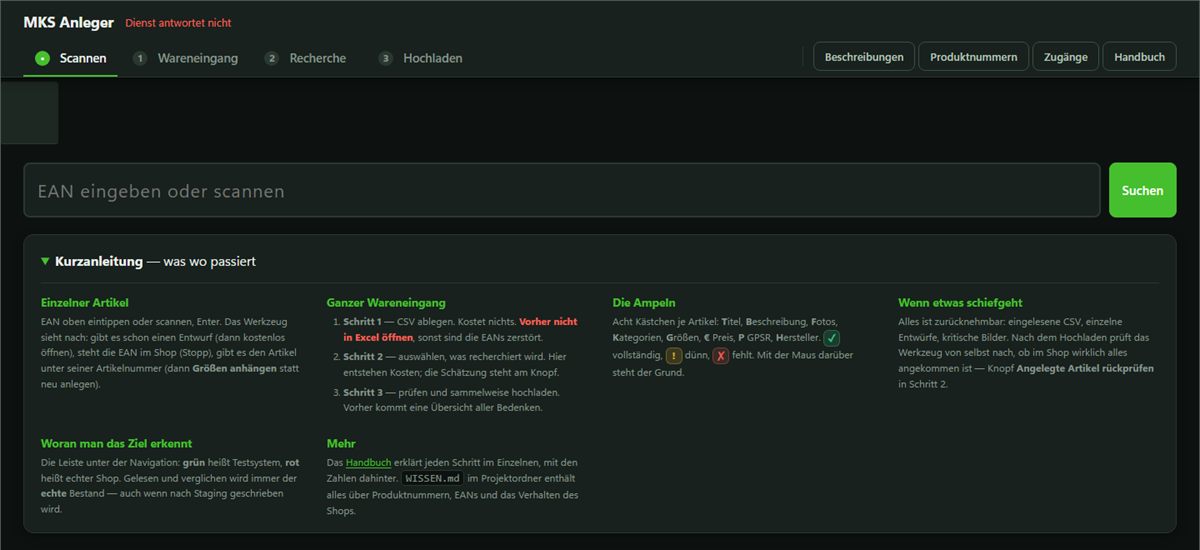
Interface of the tool: header with the four steps Scannen, Wareneingang, Recherche and Hochladen, below it an input field for the product number and a short guide in four columns.
Captured without a running service – which is why “Dienst antwortet nicht” (service not responding) appears at the top and the lists are empty. That is exactly the point here: what can be seen is the design, not a single record from the shop.

Five pages, clearly separated

PagePurposeAffects
Create The main route: incoming goods, research, review list, upload reads the live shop, writes to the test system
Descriptions Review existing texts and plan a rewrite reads the live shop, writes only locally
Product numbers Review numbers, assess them and note down the rule behind them reads the live shop, writes only locally
Access The brands’ B2B portals: access, conditions, copyright notice local only
Manual Operation, step by step –

The table has three columns – on a phone it can be swiped sideways.

Target system indicator. The tool can write to two systems. The header therefore shows at all times which one is currently being worked on. The indication comes from the connection itself – not from a label that someone might forget to switch over.

Eleven stations

From the delivery line to the post-check in the shop. The right-hand column shows whether a station costs money and whether it changes the shop.

StationWhat happensConsequences
00 · Catalogue copyThe stock is fetched read-only as a local copy.read-only
01 · Delivery listOld character encoding, messages before the header row, corrupted identifiers – detected rather than guessed.changes nothing
02 · MatchingMulti-stage duplicate check. Result: new, partly present or present.changes nothing
03 · CategorisingCategories, size axis and properties from the most similar existing products. Without a language model.changes nothing
04 · ResearchLanguage model with web search, only for selected products. Limits per product and per day stop the run.costs money
05 · ProposalTitle, description, product number and mandatory details in the house style.changes nothing
06 · ReviewTraffic light per field, concerns at three levels.changes nothing
07 · ApprovalA person sets the price and approves. Without a price, nothing is created.Lock
08 · CreateOne call creates the parent product, sizes, categories and properties. Inactive, zero stock.changes the shop
09 · Post-checkEvery product is read afresh and compared against the proposal.read-only
10 · RollbackFiles, drafts and jobs can be discarded individually.reversible
Where a product can fail
  • On reading in. Corrupted product identifier, wrong character encoding, messages before the header row, size lines without grouping.
  • Against the stock. Duplicates at several stages, authenticity of the identifier via the allocation range, attachment target for missing sizes, age of the catalogue copy.
  • At research. Consistency between product type and image, weight against size range, source requirement, hard cost caps.
  • At the image. Origin and right of use per brand, format, background removal with metrics, deep check, follow-up check.
  • Before creation. Traffic light per field with a plain-language reason: stop, warning or note.
A matching check digit proves nothing

Anyone who assigns numbers themselves usually calculates the check digit correctly. What is checked, therefore, is the allocation range: ranges reserved for in-house use must not enter the shop as an official identifier.

Why categorising without AI is better

The question “where does a softshell jacket belong?” has long been answered in the stock – hundreds of times, by people who know the shop. Having a language model choose from several hundred categories costs money, takes time, and at best justifies itself with “because it fits”. Matching against the most similar existing products costs nothing and justifies itself: because 214 other softshell jackets are there.

Images

Three separate routes, distinguished by how strongly they intervene.

RouteWhat it doesWhen
StandardCropping, squaring, white background, uniform edge margin. Purely computational, without AI.on every image
Deep checkFive methods search for markings and measure image defects. Changes nothing.in the review screen
Image editingManual re-cutting when the automation reaches its limit.on request
What the deep check looks for – and why it removes nothing on its own

It looks for copyright notices in the metadata fields, for lettering, for faint overlays, for patterns in the least significant bit and for repeating tiles. All algorithmic, without any outside call. Each of the five searches also states what it cannot do.

Every find gets a frame, a number and – for invisible finds – an evidence image. Then the tool asks, and without an answer nothing happens. A find classified as third-party blocks the image. Only what a person has confirmed as their own mark is removed. A third-party photo does not become one’s own through editing, and a removed copyright notice makes the situation worse.

Measurement is done on a test bench with self-generated test images. Half of the cases check whether the search can stay silent – a detector that goes off on every image is as useless as one that never goes off. This uncovered five real bugs, including a search that mistook the ventilation slots of a helmet for a pattern.

Background removal without AI

Instead of a fixed brightness threshold, a model of the background is fitted to the edge pixels – a slightly tilted plane with fall-off towards the centre. This covers lighting gradients and vignetting. The tolerance comes from the spread of these edge pixels: a clean light tent gets a tighter one than a wooden table. White on white without contrast is reported as unsuitable rather than guessed.

The rule sets

Read off the existing stock, not invented. Their content is business know-how and is not given here – what is described is what they decide.

Rule setWhat it decides
Number structureWhat the product number of a new model has to look like – and when, by exception, it differs.
Duplicate checkWhether the product already exists. Several stages, from “proof” to “hint”.
CategorisationCategories, size axis and properties – from the most similar existing products.
Number authenticityWhether a number is an assigned identifier or invented in-house.
House styleStructure of title and description, what belongs in them and what never does.
Image source per brandWhich dealer access the material comes from and which copyright notice is carried along.
Cost limitsHow much a research run may cost per product and per day.

What else it can do

Much of this came about during building, because a closer look revealed that something was missing.

Status

Built in August 2026, component by component. The core works.

Surveying the stockDone
Reading, mirroring, checkingDone
Categorising and proposalDone
Write path and rollbackDone, on the test system
Images from the dealer portalsDone
Image check and manual editingDone
Plausibility and title reviewIn progress
From the test system to the live shopOpen – it remains to be clarified which system holds which product data

The tool replaces no one; it takes over the typing. The price is never set automatically. It runs on one computer, without a network service, and accesses the shop server read-only. Image material comes from the manufacturers’ B2B portals or from in-house photography – an edited image is not free of rights. The tool is shown with the consent of Muskelkater Sport Köln and without data from ongoing operations.

Who this is built for

Starting point
Incoming goods arrive as a delivery list. Creating products from it by hand takes a long time, and the longer it takes, the more inconsistent the data in the shop becomes.
Target group
Shopware operators with regular deliveries and a catalogue that follows its own house rules: number structure, size axes, categories, spellings.
Status
In development. Core, interface and test benches are running; the write path has been run through on a test system. The tool is not yet in live operation.
Availability
On request, as a custom implementation. The tailoring depends on the catalogue: the rules come from the existing stock, not from a preset.
Next step
Running through the process above once shows whether it fits a shop’s incoming goods. If it does, a message is welcome.

Contact

Questions about how it is built, the decisions behind it or its transferability to a different case.

Arithmetic check Arithmetic task, shown as an image

No Google captcha, no cookies, nothing passed to third parties. Prefer e-mail? info@timobritz.de.