Foot measurement · ski boot size · kiosk operation

Fußanalyse – foot measurement for ski boot fitting

Custom software for the BootDoc foot scanner at Muskelkater Sport Köln. It measures both feet on the glass plate in a single pass and derives the ski boot size in Mondopoint, the matching shell size, the EU, UK and US sizes, the last width, the heel shape and the foot arch.

In use at Muskelkater Sport · first version of 27 September 2026
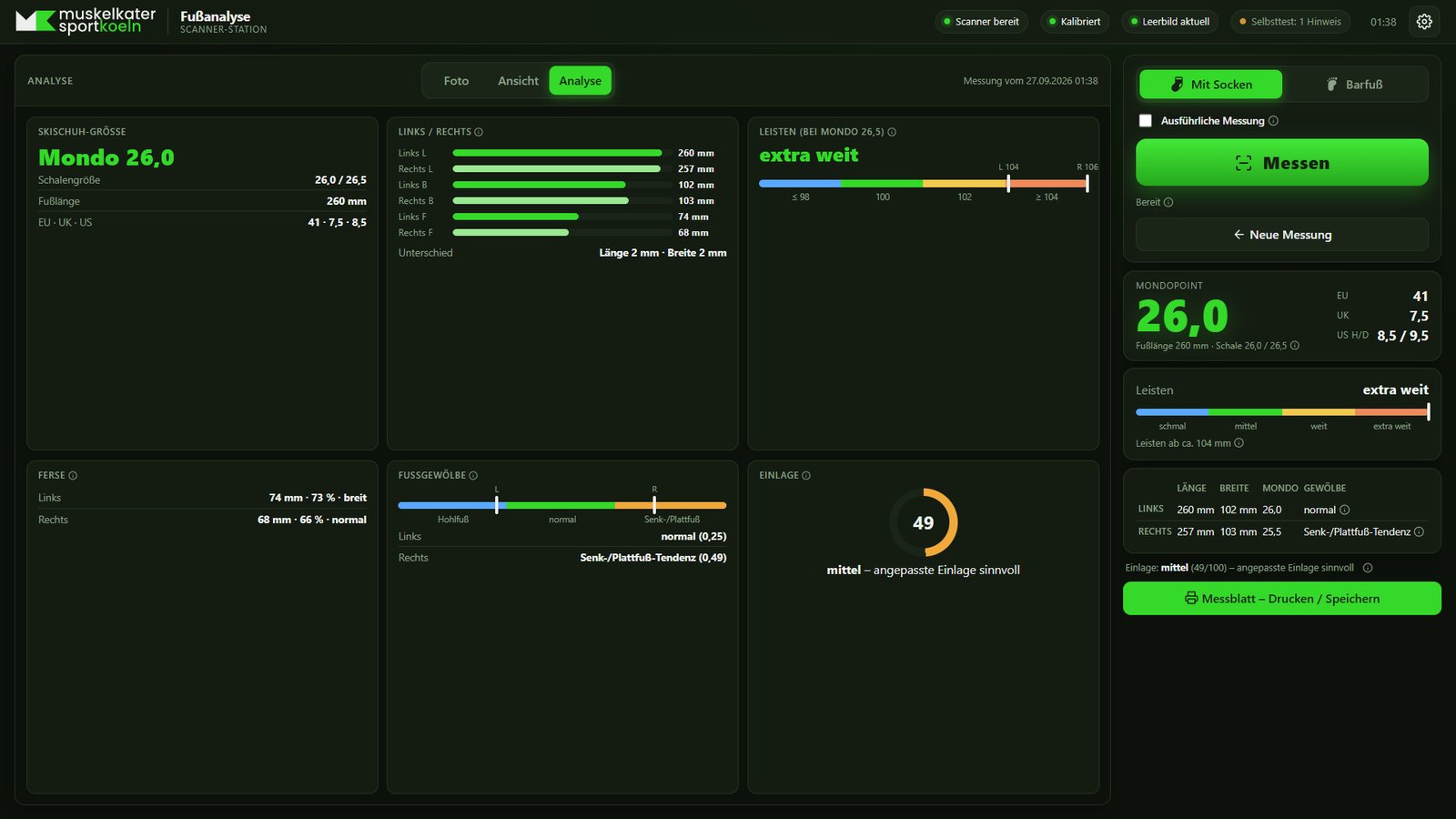
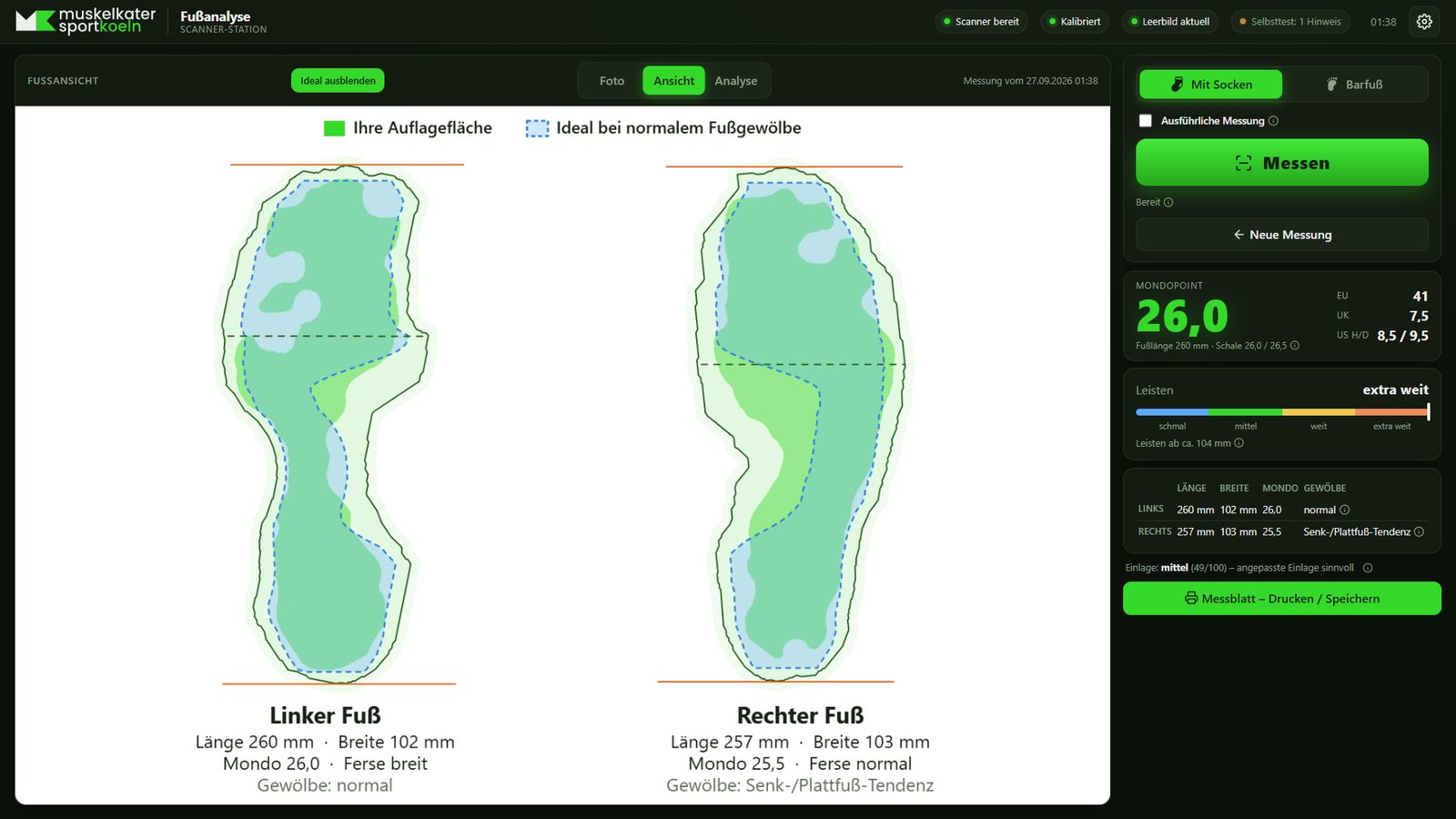
Fußanalyse interface in the Analysis view: tiles for ski boot size, left and right comparison, last width, heel, foot arch and insole; on the right Mondopoint 26.0 with EU 41, UK 7.5 and US 8.5 or 9.5.
Analysis view after a measurement in socks. The values come from a stored test image and contain no customer data. The interface is in German.

Measurements

Every measurement covers both feet. The sizes are based on the longer foot, the last width on the wider one.

Ski boot sizeMondopoint in half sizes, derived from the foot length in millimetres.
Shell sizeThe shell that covers two half Mondo sizes, for example 26.0/26.5.
Street shoe sizeEU, UK and US for women and men, with an adjustable allowance.
Last widthBall width, scaled to Mondo 26.5 and classified from narrow to extra wide.
HeelHeel width relative to ball width: narrow, normal or wide.
Foot archPer foot as a tendency towards high arch, normal, or a tendency towards flat foot.
Left and rightLength, width and Mondo per foot, and the differences between the two.
InsoleA recommendation on a scale from 0 to 100 in three levels.
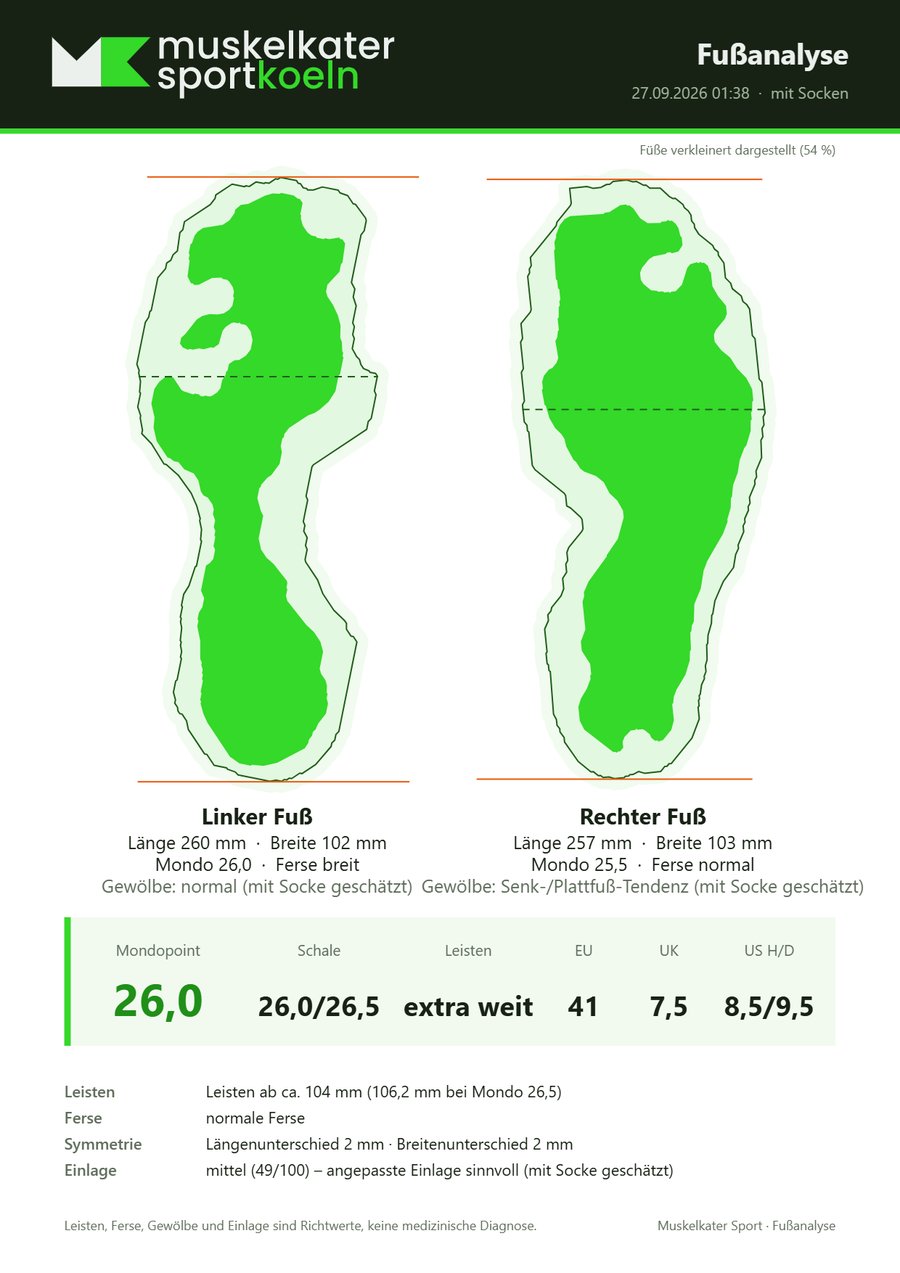
Measurement sheetAn A4 page with logo, both foot outlines and all values, for printing or saving.
Arch and insole recommendation in detail

The arch is determined using the Chippaux-Smirak index, i.e. the narrowest contact width in the midfoot relative to the widest contact width in the forefoot. Values below 0.25 count as a tendency towards high arch, values up to 0.45 as normal and higher values as a tendency towards flat foot.

The insole recommendation is derived from the deviation from the normal range and from a length difference between the feet of 5 mm or more. Up to 34 it reads “off-the-shelf insole sufficient”, up to 69 “adapted insole advisable” and above that “custom insole recommended”.

Measuring in socks or barefoot

In socks the contact area is only faintly visible. The quick measurement then provides length, width, sizes, last and heel. With socks, the software determines arch and insole recommendation only in the detailed measurement and marks them as estimated. Barefoot, both values are always determined. An adjustable amount is deducted from length and width for the sock.

A4 measurement sheet: the Muskelkater Sport logo at the top, below it the outlines of the left and right foot with length, width, Mondo, heel and arch, at the bottom Mondopoint 26.0, shell 26.0/26.5, last extra wide and EU 41, UK 7.5 and US 8.5/9.5.
The measurement sheet of a test measurement. It carries no customer name.

Last, heel, arch and insole recommendation are guide values for fitting advice and not a medical diagnosis.

How a measurement works

The interface needs a single button and guides through the measurement with hints in the live image.

Step 1

Positioning

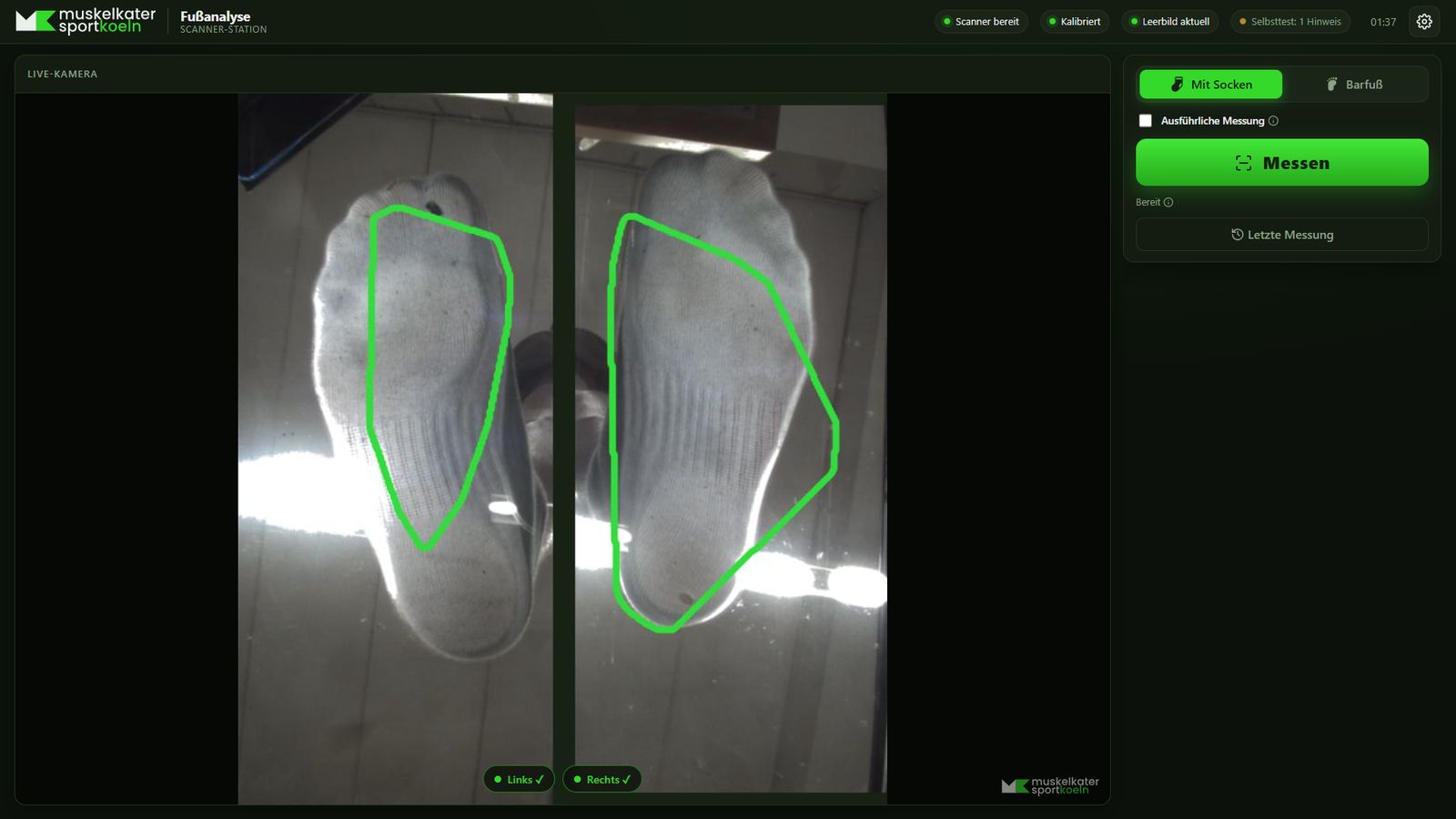
The live image shows both halves of the plate. A green outline confirms the correct stance. An orange outline appears together with a hint, for example when the heel is at the edge.

Step 2

Start

The measurement begins as soon as both feet have stood correctly and still for 1.5 seconds. Alternatively it can be started with the button or the space bar.

Step 3

Capture

The quick measurement evaluates three images and takes the median. The detailed measurement captures nine images in three passes and additionally states the measurement uncertainty.

Step 4

Result

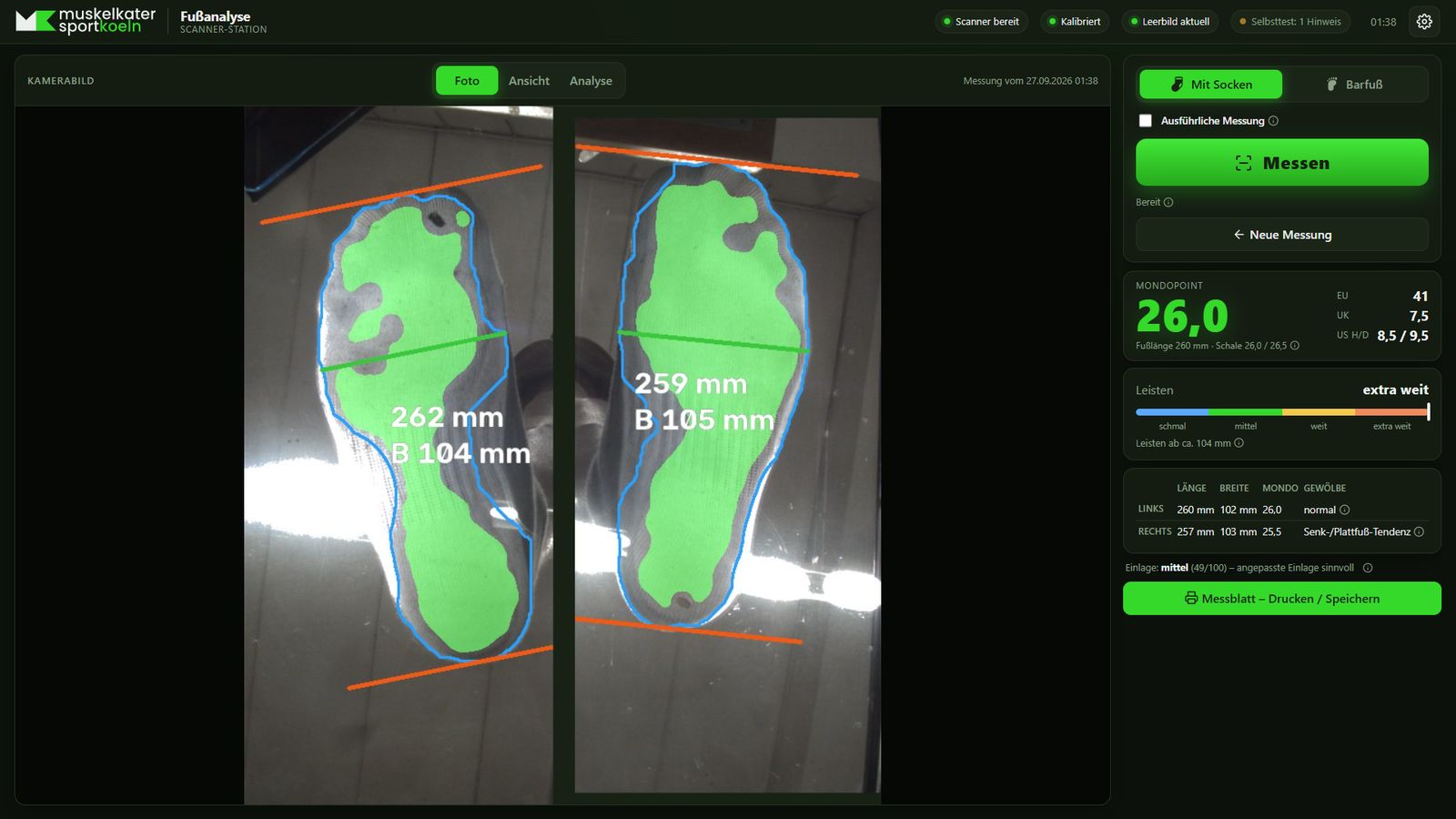
Three views are available: the camera image with measurement lines, the straightened feet and the analysis. The measurement sheet summarises everything.

Fußanalyse live camera: two feet in socks on the two glass panels, each with a green outline, and at the bottom the markers Left and Right with ticks.
Live image with positioning aid. Both feet are placed correctly.
Camera image after the measurement: contact area marked in green, foot outline in blue, orange lines at heel and toes and a green line for the ball width, with length and width for each foot.
Camera image with contact area, outline and length and width lines.
Foot view with the ideal overlaid: the measured contact area of both feet in green, with the contact area of a normal foot arch dashed in blue on top.
Foot view with the contact area of a normal arch overlaid for comparison.

Operation in the shop

The software runs on a computer on the shop floor and is designed to operate without supervision.

Kiosk modeFull screen without access to Windows. The Windows key, Alt+Tab, Alt+F4 and browser shortcuts are blocked, and a closed window reopens immediately.
Access protectionSettings, calibration and shutdown are protected by PINs, separately for staff and owner.
Start-upThe software starts with Windows and captures the empty plate and the lighting during the first 30 to 45 seconds.
Self-testCamera, calibration, glass area, position of camera and plate, lighting and disk space are checked at start-up.
UpdatesNew versions arrive via a shared OneDrive folder and are installed automatically at start-up.
Measurement dataMeasurements are stored without names. A size-limited archive of the raw images serves to improve the detection later.
InstallationAn installer sets up the program, desktop shortcut, autostart and the scanner's USB driver.
How an update works

A script on the development machine builds the program, packages it and places the package in the OneDrive folder together with a description and a SHA-256 checksum. At start-up the shop PC checks whether a newer version is there, verifies the checksum, backs up the current version and installs the new one. Calibration, settings and image archive are retained.

If the new version does not respond within 90 seconds, the update restores the previous one and blocks the faulty version. Version and update status can be read in the settings.

Architecture

Fußanalyse is written in Python and delivered as a Windows program. A local web server provides the interface, which runs full screen in the browser.

2feet in a single pass
3images per quick measurement, evaluated as the median
9images per detailed measurement
±3 mmpermitted deviation on the test foot
CameraOwn control of the camera via USB.
Image processingOpenCV and NumPy for rectification, foot detection and measurement.
InterfaceHTML in the browser, fitting without scrolling on screens from 1280 × 720 to 1920 × 1080.
DeliveryA single executable built with PyInstaller, together with installation and update scripts.
Calibration, foot detection and accuracy
  • Calibration. A printed A4 chessboard pattern is placed on each half of the plate. From it the software calculates the lens distortion and a transformation for each half that produces a true-to-scale top view.
  • Foot detection. The sole resting on the glass is in sharp focus, while legs and ceiling behind it are blurred. The software therefore separates by image sharpness and then determines the outline with GrabCut. Gaps caused by overexposed ceiling lights are bridged.
  • Exposure. The exposure settles after start-up and is then held fixed. If areas are overexposed, the measurement additionally captures a short-exposure image.
  • Accuracy. For test measurements the foot is also measured by hand. The software learns a correction from the deviations. A printable test foot serves as a check.

Status

DevelopmentStarted on 26 September 2026, first installation package on 27 September 2026.
UseAt the foot scanner of Muskelkater Sport Köln.
AvailabilityA one-off build for this device and not a finished product.
Related projects Kontor and the online shop for the same business.

BootDoc is a trademark of its owner and is mentioned here only to identify the device. Fußanalyse is an independent development and has no connection with the manufacturer of the scanner.

The screenshots were produced with the software's test environment from a stored test image. They contain no customer data.

Contact

Questions about the measuring method or its transfer to another device can be sent using the form below.

Arithmetic check Arithmetic task, shown as an image

No Google captcha, no cookies, no disclosure to third parties. Alternatively by e-mail to info@timobritz.de.